



The Role of DevOps in Enhancing Software Test Automation
DevOps
5 MIN READ
January 17, 2026


Software development today is fast, collaborative, and continuous. Businesses need to deliver high-quality software quickly, without compromising on reliability. To achieve this, many organizations are adopting DevOps, a culture and practice that brings development and operations teams together for faster, more efficient delivery.
Within this approach, test automation plays a vital role. It ensures that every piece of code is tested automatically, saving time and reducing human error. When combined with DevOps principles, test automation becomes even more powerful by enabling continuous integration, continuous delivery, and continuous feedback.
This blog explains how DevOps test automation enhances software quality, the benefits it brings, and best practices for achieving continuous quality in software delivery.
Understanding DevOps and Test Automation
DevOps focuses on collaboration, automation, and shared responsibility between development and operations teams. It aims to shorten the software development lifecycle while maintaining high quality and reliability.
Test automation involves using software tools to run predefined test cases automatically. It helps detect bugs faster and ensures that changes in code do not disrupt existing features.
When DevOps and test automation come together, they create a system of continuous testing where code is validated at every stage of development and deployment. This reduces risks and accelerates time to market.
How DevOps Test Automation Enhances Software Quality
Integrating automated testing throughout the DevOps pipeline accelerates delivery cycles by reducing bottlenecks and enabling continuous feedback. This approach improves software quality by catching defects early, ensuring reliable releases, and fostering collaboration between development, testing, and operations teams.
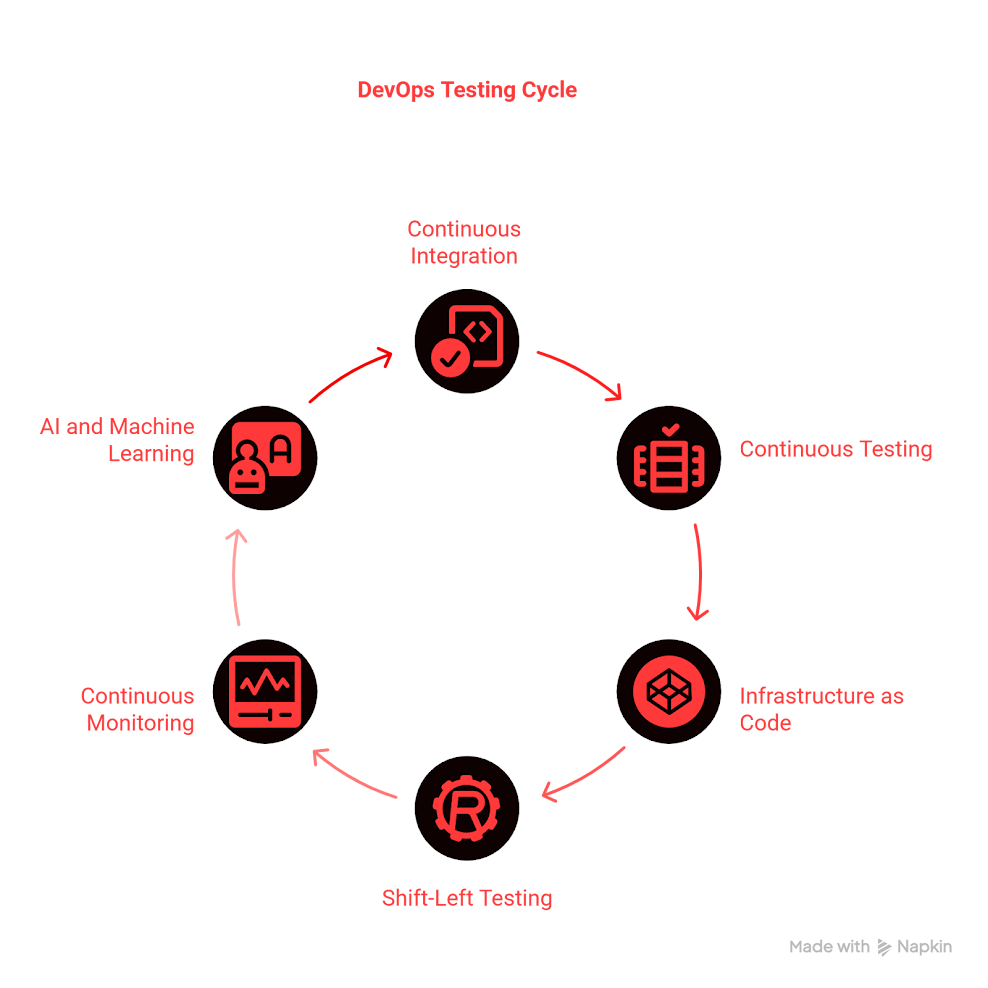
1. Continuous Integration and Continuous Testing
DevOps encourages Continuous Integration (CI), where developers frequently merge their code into a shared repository. Each integration triggers automated tests that validate the build immediately.
With Continuous Testing, automated tests run throughout the development lifecycle, not just before release. Tools like Jenkins, GitLab CI, and Azure DevOps make this possible by running test suites automatically after every code commit.
Result: Bugs are identified early, builds are more stable, and releases are faster.
2. Infrastructure as Code for Consistent Test Environments
A major challenge in testing is maintaining consistency across environments. Traditional setups often differ between development, testing, and production, leading to unpredictable results.
DevOps addresses this through Infrastructure as Code (IaC), where environments are defined using code and automation tools such as Terraform, Docker, Kubernetes, and Ansible.
With IaC, teams can:
- Create identical test environments quickly.
- Run tests in parallel with stable configurations.
- Reproduce bugs and test conditions easily.
Result: Testing becomes reliable, scalable, and repeatable across all environments.
3. Shift-Left Testing Approach
DevOps promotes the shift-left concept, which means testing begins early in the development cycle. Instead of waiting until the end, testing becomes part of the coding and integration phases.
This approach allows teams to:
- Detect and fix defects earlier.
- Collaborate better between developers, testers, and operations.
- Improve code quality before it reaches production.
By integrating automated unit, API, and UI tests early, teams can ensure every code change is validated before deployment.
Result: Less rework, faster feedback, and higher-quality releases.
4. Continuous Monitoring and Feedback
In a DevOps environment, the testing process continues even after deployment. Continuous monitoring tools like Prometheus, Grafana, and New Relic track application performance, user behavior, and system health in real time.
The feedback collected from these tools helps improve test coverage and automation strategies. Teams can refine scripts, detect emerging issues, and update tests proactively.
Result: Continuous learning and improvement in testing accuracy and efficiency.
5. AI and Machine Learning in DevOps Testing
Modern DevOps teams are adopting AI and machine learning to make test automation more intelligent. These technologies help identify patterns, prioritize tests, and predict areas likely to fail.
Benefits include:
- Smarter test case selection and prioritization.
- Elimination of redundant or low-value tests.
- Faster execution with better accuracy.
Result: Testing becomes data-driven and more efficient, helping teams release software with higher confidence.
DevOps Testing vs Traditional Testing
Testing has evolved significantly over the years. Traditional testing often takes place after development is complete, while DevOps testing integrates quality checks throughout the lifecycle. Understanding this difference helps highlight why DevOps-driven automation is essential for modern development.
| Aspect | DevOps Testing | Traditional Testing |
| Testing Frequency | Continuous testing throughout the lifecycle | Testing occurs after development ends |
| Automation Level | Highly automated and integrated with CI/CD pipelines | Mostly manual or semi-automated |
| Environment Setup | Managed through Infrastructure as Code for consistency | Often manual and environment-dependent |
| Feedback Speed | Instant feedback after each code change | Feedback arrives late in the process |
| Testing Approach | Shift-left approach with early testing | Testing happens toward the end of the SDLC |
| Collaboration | Shared responsibility among Dev, QA, and Ops | QA works in isolation from development |
| Release Cycle | Short, frequent, and iterative | Long, sequential, and phase-based |
Key Takeaway:
DevOps transforms testing from a final step into a continuous, integrated activity that ensures quality at every stage. This shift allows teams to deliver updates faster, improve collaboration, and maintain higher levels of reliability.
Benefits of Combining DevOps and Test Automation
The combination of DevOps and test automation delivers significant advantages:
- Faster Delivery: Continuous integration and automated testing reduce release times.
- Higher Quality: Early and frequent testing ensures fewer defects reach production.
- Improved Collaboration: Shared tools and responsibilities strengthen communication across teams.
- Reduced Costs: Early issue detection saves resources and minimizes rework.
- Continuous Improvement: Real-time feedback loops lead to ongoing optimization.
Together, DevOps and automation create a culture of quality and agility across the entire software lifecycle.
Challenges in Implementing DevOps for Test Automation
While the benefits are clear, implementing DevOps-driven automation can bring challenges such as:
- Complex Tool Integration: Connecting multiple CI/CD, testing, and monitoring tools effectively.
- Skill Gaps: Teams may lack cross-functional knowledge in both DevOps and testing.
- Cultural Shifts: Moving from siloed workflows to collaborative environments requires a mindset change.
- Test Data Management: Maintaining consistent and realistic test data at scale.
These challenges can be addressed through training, collaboration, and adopting standardized DevOps frameworks.
Best Practices for Implementing DevOps for Quality Assurance and Test Automation
To successfully adopt DevOps for test automation:
- Start with high-impact test cases and expand coverage gradually
- Foster a continuous testing culture across all teams.
- Use containerized or cloud-based environments for consistency.
- Leverage CI/CD tools to automate testing at every stage.
- Continuously monitor performance and iterate based on feedback.
Conclusion
DevOps has redefined how teams build, test, and deliver software. When integrated with test automation, it creates a development ecosystem that promotes speed, consistency, and continuous quality. By embedding automated tests throughout the DevOps pipeline, businesses can accelerate delivery, reduce errors, and improve customer satisfaction.
This combination turns testing into an ongoing, proactive process that enhances both product quality and team efficiency. Organizations that embrace DevOps-driven test automation are better prepared to innovate, adapt, and deliver reliable software in an increasingly competitive digital world.
At Ksolves, we offer expert DevOps consulting services to help your organization implement efficient test automation strategies. Partner with us to streamline your software delivery processes, enhance quality, and achieve faster, more reliable releases.
Frequently Asked Questions
What is DevOps test automation?
DevOps test automation integrates automated testing into the DevOps pipeline, enabling continuous testing
throughout the software development lifecycle to improve speed, quality, and reliability.
How does DevOps improve software testing?
DevOps promotes collaboration between development, testing, and operations, incorporating continuous
integration and continuous testing that catch defects early and streamline delivery cycles.
What is shift-left testing in DevOps?
Shift-left testing means starting testing activities early in the development process to detect and resolve
issues sooner, reducing defects and rework.
Which tools are commonly used for DevOps test automation?
Popular tools include Jenkins, GitLab CI/CD, CircleCI, Selenium, and testRigor, which support automated
testing integrated with CI/CD pipelines.
How does AI enhance DevOps testing?
AI helps optimize test case selection, prioritize testing efforts, and reduce redundant tests, increasing
efficiency and accuracy in automated testing.





































Author
About the Author Editorial Team The Ksolves Editorial Team includes certified Salesforce experts, Big Data engineers, AI/ML specialists, Zoho consultants, and experienced technology writers focused on delivering clear, actionable insights for modern businesses. With hands-on experience across Salesforce, Big Data platforms, AI/ML solutions, application development, software testing, and Zoho ERP/CRM, the team publishes practical guides, real-world use cases, and industry updates that support smarter decisions and faster growth. Every article is created to solve business challenges, guide technology adoption, and keep organizations aligned with evolving digital ecosystems.
Share with