



Steps to Test and Validate Your Upgraded Apache NiFi Version
Big Data
5 MIN READ
December 30, 2025

Upgrading Apache NiFi is far more than a routine patch or version bump—it’s a strategic move that directly impacts the stability and scalability of your entire data ecosystem. Modern enterprises depend on NiFi to move, transform, and secure critical data streams in real time. With every new release comes valuable benefits—enhanced performance, cutting-edge processors, security hardening, and compatibility with evolving technologies.
Those benefits come with risks. A single oversight can cause downtime, data errors, or compliance issues. Teams often miss the complexity—processor changes, dependency updates, and configuration shifts can all create hidden problems.
That’s why a careful, end-to-end testing and validation plan is vital. By mapping dependencies, simulating real workloads, and verifying performance before production, you can avoid downtime and data loss. Whether it’s a small update or a major release, a structured upgrade process keeps pipelines stable and business operations uninterrupted. This guide provides a clear, step-by-step approach to plan, test, and validate your NiFi upgrade, so you can adopt new features with confidence while preserving the reliability your organization relies on.
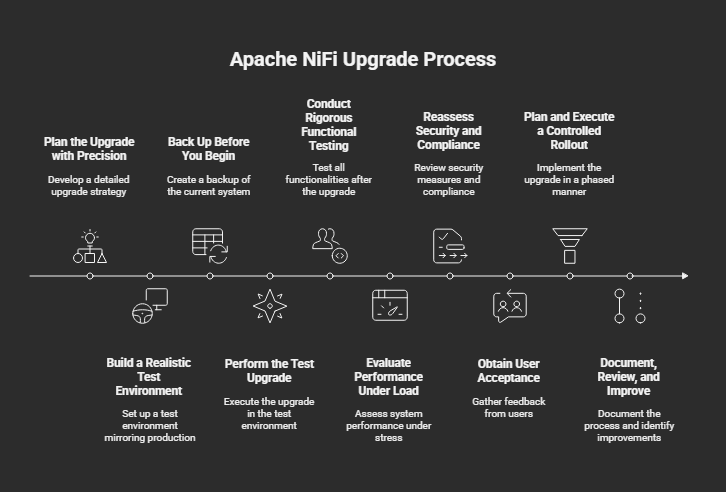
Steps to Test and Validate NiFi Upgrade
-
Plan the Upgrade with Precision
Map Your Current Landscape
Start by documenting every NiFi cluster, node, processor, and controller service. Capture details on hardware specifications, JVM settings, external integrations, and custom NARs or scripts. A complete inventory highlights dependencies and surfaces components that may need extra attention.
Study Release Notes and Compatibility Guides
Read the official Apache NiFi release notes for your target version, focusing on deprecated processors, breaking API changes, and configuration updates. Check community forums and JIRA issues for known bugs or upgrade pitfalls.
Define Success Metrics
Set clear benchmarks for a “successful” upgrade—whether that means zero data loss, stable throughput, or specific performance targets. These criteria become your yardstick during testing.
Want to know more about the NiFi 2.0 Upgrade? Then read our blog – NiFi 2.0 Upgrade Guide
-
Build a Realistic Test Environment
Replicate Production
Create a staging cluster that mirrors production hardware, operating system, JVM version, and network topology. Matching environments ensures your tests uncover issues that would appear in real life.
Clone Data Flows and Configurations
Export your flows and controller services to the test cluster, keeping credentials and endpoints separate. The goal is a safe, isolated replica of your production data flows.
Isolate Network Access
Use distinct credentials and segregated network routes to prevent accidental interference with live systems.
-
Back Up Before You Begin
A reliable backup is your first line of defense. Safeguard:
- Configuration Files, such as flow.xml.gz
- State and Content Repositories
- NiFi Registry and Versioned Flows
- Custom Scripts and Processor Bundles
Validate the backup by restoring it in a sandbox to ensure it’s complete and usable.
-
Perform the Test Upgrade
Upgrade a single node in your staging cluster following the official NiFi instructions. Monitor startup logs for warnings about missing processors, schema changes, or configuration conflicts. Fix any errors before expanding to additional nodes.
-
Conduct Rigorous Functional Testing
- Core Data Flow Validation: Push representative data through key pipelines and confirm the output matches expectations.
- Custom Processor Verification: Rebuild and test custom NARs or third-party extensions to confirm compatibility.
External Integration Checks: Validate database connections, message queues (Kafka, RabbitMQ), cloud storage buckets, and REST API calls.
-
Evaluate Performance Under Load
Use historical data volumes or synthetic test data to simulate real workloads. Measure:
- Throughput (records per second)
- Latency
- CPU, memory, and disk usage
Compare these metrics with pre-upgrade baselines to detect regressions or capacity changes.
-
Reassess Security and Compliance
- Authentication & TLS: Confirm that user logins, certificates, and Kerberos configurations function seamlessly after the upgrade.
- Access Policies: Review role-based access controls—NiFi upgrades can reset or modify defaults.
- Audit & Provenance: Ensure that logging, provenance data, and regulatory audit trails remain intact.
-
Obtain User Acceptance
Invite data engineers, operations staff, and business stakeholders to test the environment. Their sign-off ensures that pipelines meet functional and performance expectations across teams.
-
Plan and Execute a Controlled Rollout
- Schedule a Maintenance Window: Communicate downtime expectations to downstream consumers.
- Upgrade in Phases: For clusters, upgrade nodes incrementally and monitor cluster stability after each step.
- Monitor Closely: Leverage NiFi’s built-in metrics, Prometheus/Grafana dashboards, and centralized logging to catch anomalies early.
-
Document, Review, and Improve
Record every step, backup strategies, test results, performance benchmarks, and lessons learned. Comprehensive documentation not only aids future upgrades but also simplifies audits and supports compliance.
Final Thoughts
An Apache NiFi upgrade is an opportunity to enhance performance and security, but only if managed with discipline. By carefully planning, testing in a production-like environment, and validating every detail from processors to permissions, you ensure a seamless transition that protects your data pipelines and business operations.
If you are looking for expert guidance, Ksolves offers a comprehensive NiFi upgrade service, from environment assessment and backup planning to testing, performance tuning, and post-upgrade support. Our dedicated team ensures your upgrade is smooth, secure, and optimized for future growth.




































AUTHOR
Big Data
Anil Kushwaha, Technology Head at Ksolves, is an expert in Big Data. With over 11 years at Ksolves, he has been pivotal in driving innovative, high-volume data solutions with technologies like Nifi, Cassandra, Spark, Hadoop, etc. Passionate about advancing tech, he ensures smooth data warehousing for client success through tailored, cutting-edge strategies.
Share with