

 Salesforce
 5 MIN READ


Ever wanted to make your business operations run more smoothly, improve sales team productivity, and build stronger customer relationships? A well-implemented CRM can make a significant difference. Salesforce provides businesses with a unified platform to manage customer information, track sales activities, automate workflows, and improve communication across departments.
However, a successful Salesforce implementation is not simply about purchasing licences and moving existing customer records into a new system. It requires a clear understanding of business processes, careful planning, the right platform configuration, reliable integrations, and a structured approach to user adoption.
The implementation process also needs to account for how the business will use Salesforce as it grows. For example, a company managing thousands of customer enquiries may need automated lead assignments, while a service-driven organisation may prioritise case management, escalation workflows, and customer communication.
In this guide, we will walk through the essential stages of Salesforce implementation, from initial planning and configuration to deployment, user training, and ongoing optimisation. We will also cover practical implementation strategies and best practices to help businesses get more value from their CRM investment.
The Steps to Salesforce Implementation Success
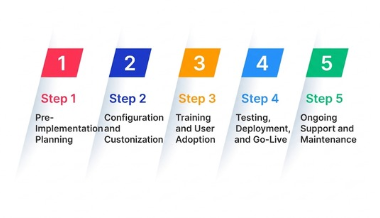
A structured implementation approach helps businesses avoid unnecessary customisation, data inconsistencies, integration issues, and low user adoption. Each stage should have clearly defined deliverables so that technical teams and business stakeholders remain aligned throughout the project.
Step 1: Pre-Implementation Planning
The first stage of a Salesforce implementation is understanding what the organisation needs from the platform. Before configuring Salesforce, businesses should evaluate their existing workflows, identify operational gaps, and establish measurable objectives.
- Define Objectives and Goals: Before implementing Salesforce, clearly define your objectives and create a practical Salesforce implementation strategy. Determine what you want to improve, whether it is lead management, sales forecasting, customer service, marketing automation, or reporting. For example, if sales representatives are spending too much time manually updating customer records, your implementation goals could include automating data entry and standardising opportunity tracking.
- Assemble a Project Team: Form a cross-functional team consisting of representatives from different departments. This should include executives, project managers, IT specialists, sales managers, customer service representatives, and end-users. Their involvement helps identify department-specific requirements and ensures that the final CRM configuration supports actual business operations.
- Budgeting: Create a realistic Salesforce implementation budget that accounts for more than subscription licences. Include expenses related to consulting, custom development, data migration, third-party integrations, testing, user training, and ongoing maintenance. Also consider future costs associated with additional users, storage requirements, and expanding business processes.
- Choose the Right Salesforce Edition: Salesforce offers different products, editions, and capabilities depending on business requirements. Evaluate the features, automation limits, reporting capabilities, integration requirements, and security controls before selecting an appropriate solution. Businesses should also assess whether they need Sales Cloud, Service Cloud, Experience Cloud, or other specialised Salesforce capabilities.
A detailed requirement assessment at this stage can prevent expensive changes later. It also gives implementation teams a clear understanding of which processes can be handled through standard Salesforce functionality and which require custom development.
Step 2: Configuration and Customisation
Once the requirements are established, the next step is to configure Salesforce around your business workflows. The objective is to make the platform useful for everyday operations without introducing unnecessary complexity.
- Data Migration and Cleansing: Evaluate the quality of your existing customer and business data before migration. Identify duplicate records, incomplete contact information, outdated accounts, inconsistent field formats, and unused records. Map the existing data fields to their corresponding Salesforce objects and establish clear migration rules. For instance, customer details stored in spreadsheets, sales history in an older CRM, and support records in another application may need to be consolidated before migration. Conduct test migrations and validate record counts, relationships, and field mappings before moving the complete dataset.
- Customisation: Salesforce provides considerable flexibility through custom objects, fields, validation rules, Lightning Web Components (LWC), Apex, and automation. Businesses can use these capabilities to support workflows that standard CRM functionality does not fully address. For example, a manufacturing company may require custom dealer onboarding fields, approval processes, and distributor performance dashboards. However, customisation should solve a specific operational requirement rather than replicate every feature of an existing legacy system. Working with experienced Salesforce developers or consultants, such as Ksolves, can help businesses choose the right approach.
- Data Integration: Integrate Salesforce with existing business applications to maintain a consistent flow of information across departments. Common integrations include marketing automation platforms, ERP systems, accounting software, e-commerce applications, and customer support tools. Depending on the architecture, teams can use MuleSoft, REST APIs, SOAP APIs, platform events, or custom connectors. For example, connecting Salesforce with an accounting platform can help sales representatives access relevant financial information without switching between multiple applications.
- Workflow Automation: Identify repetitive activities that can be automated using Salesforce Flow, approval processes, assignment rules, and other native capabilities. A sales team, for example, can automatically assign incoming leads based on territory, notify representatives about high-priority opportunities, and create follow-up tasks when an opportunity moves to a particular stage.
It is important to maintain a balance between configuration and custom development. Native Salesforce capabilities should generally be considered first, while custom code should be introduced when there is a clear functional or technical reason.
Step 3: Training and User Adoption
Even a technically sound CRM implementation can struggle if employees do not understand how to use it. User adoption should therefore be treated as an essential implementation activity rather than something that begins after deployment.
- Salesforce Adoption Strategies: Develop adoption strategies that align with departmental responsibilities and business objectives. Sales representatives may need training on lead management, opportunity tracking, and forecasting, while customer support teams may require guidance on case management, service queues, and escalation processes. Training should reflect the actual tasks employees perform instead of covering every platform feature without context.
- User Adoption Plan: Create a structured adoption plan that explains how Salesforce will support employees in their daily work. Communicate the benefits of using the platform, introduce clear usage expectations, and provide role-specific demonstrations. You can also introduce recognition programmes or incentives for teams that maintain accurate CRM records and consistently follow defined processes.
- Feedback Loop: Establish a feedback mechanism through which employees can report issues, request improvements, and share suggestions. For example, if sales representatives find the opportunity creation process unnecessarily complicated, the implementation team can review the number of required fields and simplify the interface. Regular feedback sessions help identify usability problems before they affect wider adoption.
- User Guides and Resources: Provide user guides, short video tutorials, process documentation, and frequently asked questions. These resources should explain common activities such as creating leads, updating opportunities, logging customer interactions, generating reports, and managing service cases. A central knowledge base also helps new employees understand established workflows without depending entirely on individual colleagues.
- Monitor Adoption Metrics: Track meaningful indicators such as active users, record completeness, opportunity updates, task completion, and usage of important CRM features. These metrics can help identify departments or user groups that may require additional support.
A good example of the importance of adoption is Ksolves’ Salesforce implementation for a pet health products manufacturer. The project involved improving sales operations, reporting, and data management while addressing inconsistent training and documentation across departments. It demonstrates why technical implementation and employee readiness need to progress together.
Step 4: Testing, Deployment, and Go-Live
Before making Salesforce available across the organisation, the implementation team must verify that the configured platform works as expected. Testing helps identify functional issues, incorrect permissions, integration failures, and workflow problems before they affect business operations.
- Functional Testing: Check individual Salesforce features, including custom objects, fields, validation rules, automation, reports, and dashboards. Confirm that each function performs according to the approved requirements.
- Integration Testing: Verify that Salesforce exchanges information correctly with connected applications. Test data synchronisation, API responses, error handling, and record updates to ensure that information remains consistent across systems.
- User Acceptance Testing (UAT): Involve selected employees from different departments in testing real business scenarios. For example, sales representatives can test lead assignment and opportunity updates, while support agents can check case creation and escalation workflows.
- Security Testing: Review profiles, permission sets, role hierarchies, sharing rules, and field-level security. Employees should have access to the records and information required for their responsibilities, without unnecessary exposure to sensitive business data.
- Pilot Deployment: Launch Salesforce with a smaller group of users before rolling it out across the organisation. A pilot helps identify usability concerns, missing requirements, and unexpected workflow issues while the impact remains limited.
Once testing is complete, prepare a deployment plan that includes data migration validation, user access, training completion, communication, and contingency arrangements. A phased rollout may be more suitable than a single organisation-wide launch, particularly for businesses with multiple departments or locations.
Step 5: Ongoing Support and Maintenance
Salesforce implementation does not end when the platform goes live. Business requirements, customer expectations, integrations, and Salesforce capabilities continue to evolve. Regular maintenance and optimisation help ensure that the CRM remains reliable and useful.
- Regular Updates: Keep track of Salesforce seasonal releases, security updates, and changes to platform functionality. Salesforce generally delivers three major seasonal releases each year. Review release notes, assess how changes affect existing customisations and integrations, and test relevant updates in a sandbox before deploying them into production.
- User Support: Provide ongoing assistance through a dedicated support team, service desk, knowledge base, or internal Salesforce administrator. Users should have a clear process for reporting technical issues, requesting access, and seeking help with CRM workflows.
- Performance Monitoring: Review automation failures, integration logs, data quality, storage usage, and report performance. Monitoring these areas helps identify technical problems before they disrupt business operations.
- Continuous Optimisation: Review the Salesforce environment regularly based on employee feedback, performance metrics, and changing business requirements. This could involve simplifying existing workflows, introducing new automation, improving dashboards, adding integrations, or extending Salesforce capabilities through Agentforce.
- Scalability Planning: As the organisation expands, its CRM requirements may change. Additional users, new business units, higher data volumes, and more complex workflows should be considered when planning future enhancements. A scalable architecture helps businesses extend Salesforce without repeatedly rebuilding their existing environment.
Best Practices for Successful Salesforce Implementation
Implementing Salesforce effectively involves more than technical configuration. Businesses need to establish the right processes, involve the right people, and create an environment where employees can use the platform consistently.
Here are some best practices to consider throughout the implementation process:
- Involve Key Stakeholders: Include representatives from all relevant departments during requirement gathering, configuration, and testing. Their practical insights help ensure that the CRM supports real business requirements rather than assumptions made by the technical team.
- Prioritise Scalability: Consider how the organisation may grow over the next few years. Plan for additional users, higher transaction volumes, new integrations, and evolving reporting requirements. Avoid building an architecture that only supports current operational needs.
- Maintain Data Security and Compliance: Prioritise information security through appropriate access controls, permission sets, role hierarchies, encryption where applicable, and audit mechanisms. Review regulatory requirements relevant to your industry and configure Salesforce accordingly.
- Avoid Unnecessary Customisation: Use standard Salesforce features wherever possible. Excessive custom code can increase maintenance requirements, complicate upgrades, and make it harder for employees to understand the CRM environment.
- Test Before Deployment: Carry out functional, integration, regression, security, and user acceptance testing. Testing should cover both normal business activities and unexpected scenarios, such as failed integrations, duplicate records, and incorrect data inputs.
- Use a Sandbox Environment: Develop and test configuration changes in appropriate Salesforce sandbox environments before moving them into production. This reduces the risk of disrupting live business operations.
- Document Everything: Maintain clear documentation covering system architecture, data mappings, integrations, custom components, automation rules, and user permissions. Proper documentation makes troubleshooting and future enhancements easier.
- Measure Implementation Outcomes: Establish KPIs before deployment, such as lead response time, opportunity conversion, customer service resolution time, data accuracy, and active user adoption. Compare these indicators over time to understand whether Salesforce is delivering the intended business value.
How Salesforce Agentforce Is Changing CRM Implementation
Salesforce implementation is also evolving with the introduction of Agentforce and AI-powered capabilities. Businesses can now consider how intelligent agents and automated workflows fit into their CRM strategy rather than treating AI as a separate technology investment.
Agentforce enables organisations to deploy AI agents for selected sales, service, and operational activities. Depending on the use case and configuration, these agents can assist with customer enquiries, retrieve relevant information, support lead qualification, and automate repetitive tasks.
However, implementing Agentforce requires more than enabling an AI feature. Businesses need to assess data quality, define agent permissions, establish appropriate guardrails, test responses, and determine when requests should be escalated to human employees.
For example, a customer service team could use an Agentforce service agent to handle routine enquiries while transferring complex billing disputes or sensitive requests to a human representative. Similarly, sales teams can use AI-assisted workflows to reduce repetitive administrative activities.
The foundation remains the same: well-structured customer data, clearly defined business processes, reliable integrations, and appropriate governance.
Expert Salesforce Implementation with Ksolves
Choosing the right implementation partner can make a significant difference to the success of a Salesforce project. Businesses need a team that understands not only the technical capabilities of Salesforce but also how those capabilities translate into practical operational improvements.
As a Salesforce Summit Partner, Ksolves brings experience in Salesforce consulting, implementation, customisation, data migration, integration, and ongoing support. The company has also retained its Summit Partner status for the third consecutive year in 2026, reflecting its continued presence in the Salesforce partner ecosystem.
Ksolves supports businesses across different industries with solutions tailored to their operational requirements. Its certified Salesforce professionals work across Sales Cloud, Service Cloud, Experience Cloud, Data Cloud, Agentforce, and other Salesforce technologies.
The value of this expertise can be seen in several implementation projects:
- E-commerce and Retail: In its Salesforce implementation for an e-commerce brand, Ksolves helped unify customer information using Data Cloud, introduce personalised marketing journeys, and automate customer service processes. The implementation delivered a reported 35% increase in repeat purchases within six months.
- Lead Management and CRM Migration: In its Odoo-to-Salesforce CRM migration project, Ksolves introduced automated lead capture, Gmail integration, marketing connectivity, and financial system integrations. The solution helped reduce manual data entry by 50%.
- Sales and Customer Service Automation: In a Salesforce Agentforce implementation for a SaaS provider, Ksolves introduced AI agents to automate routine support activities, sales data entry, and email drafting. The project reduced average case resolution time by 55%.
These projects demonstrate how Salesforce can be configured around specific business challenges instead of following a one-size-fits-all implementation model.
Close Out
A successful Salesforce implementation requires a clear strategy, reliable technical execution, and consistent employee involvement. From defining business objectives and preparing existing data to configuring workflows, integrating applications, and training employees, every stage contributes to the overall outcome.
Businesses should also remember that implementation is an ongoing process. Regular performance reviews, platform updates, user feedback, and process improvements help ensure that Salesforce continues to meet changing operational requirements.
Ultimately, the goal is not simply to introduce another CRM platform. It is to create a connected business environment where teams can access accurate customer information, reduce repetitive work, make informed decisions, and deliver better customer experiences.
With the right implementation strategy and guidance from an experienced Salesforce Summit Partner, businesses can build a CRM environment that supports both immediate operational needs and long-term growth.
Frequently Asked Questions
1. How long does a Salesforce implementation take?
The timeline depends on business requirements, data volume, customisation, integrations, and the number of users. A straightforward implementation may take a few weeks, while complex enterprise deployments can take several months.
2. What are the main stages of Salesforce implementation?
The main stages include requirement analysis, project planning, platform configuration, customisation, data migration, integration, testing, deployment, user training, and ongoing maintenance.
3. What are the common challenges in Salesforce implementation?
Common challenges include poor data quality, unclear business requirements, excessive customisation, integration failures, insufficient testing, security misconfigurations, and low user adoption.
4. How can businesses improve Salesforce user adoption?
Businesses can improve adoption through role-based training, simplified workflows, clear documentation, regular feedback sessions, internal support, and monitoring of user engagement metrics.
5. Why should businesses work with a Salesforce Summit Partner?
A Salesforce Summit Partner brings validated Salesforce expertise, implementation experience, technical resources, and knowledge of the broader Salesforce ecosystem. This can help businesses manage complex deployments, reduce implementation risks, and build scalable CRM environments.