



OpenShift Role-Based Access Control (RBAC) Explained
OpenShift
5 MIN READ
April 10, 2026

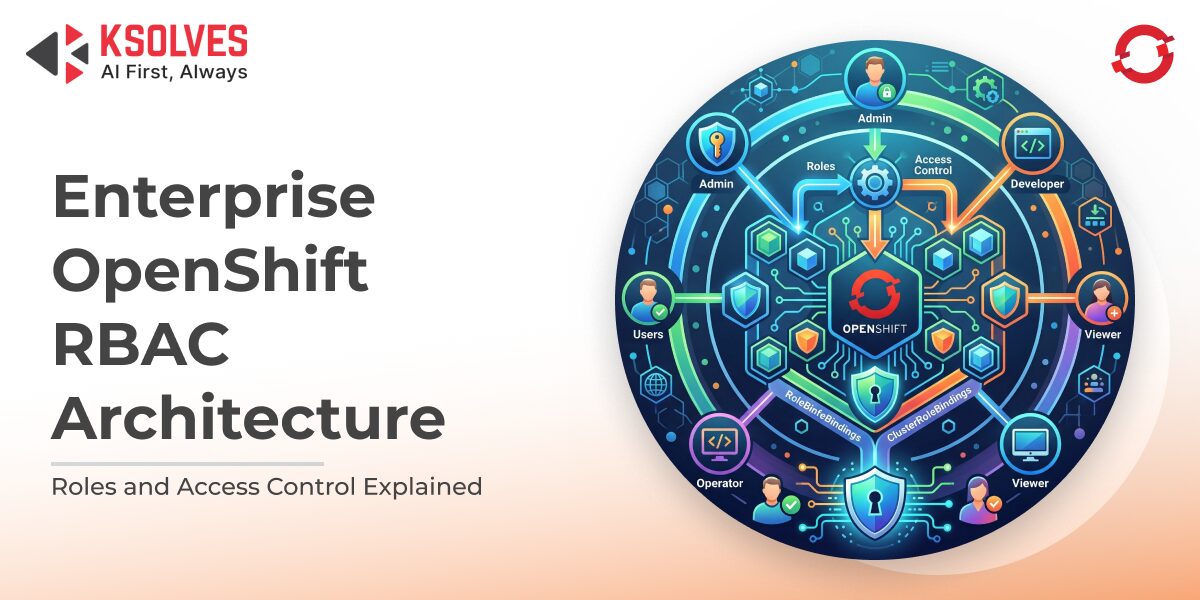
Kubernetes and OpenShift have become the backbone of modern applications. But with great power comes great responsibility, especially when it comes to who can access what. Imagine giving everyone in your office a master key to every room – chaos would ensue. That’s exactly what can happen in a cluster if access isn’t carefully controlled.
This is where Role-Based Access Control (RBAC) comes in. RBAC in OpenShift allows you to define clear roles and permissions, ensuring the right people, or applications, have access to the right resources at the right time. Whether it’s developers deploying code, operators managing clusters, or service accounts running automated workflows, RBAC ensures security, compliance, and operational efficiency without slowing your teams down.
In this blog, we’ll break down how OpenShift RBAC works, why it’s critical, and how you can use it effectively to safeguard your clusters while empowering your teams.
What is RBAC in OpenShift?
Role-Based Access Control (RBAC) is a system that manages who can do what within a cluster. Instead of giving everyone full access, a risky “blanket permission” approach, RBAC lets administrators assign specific roles to users, groups, or service accounts, following the principle of least privilege. This ensures that every individual or application can only access the resources they truly need.
OpenShift builds on Kubernetes RBAC and adds enterprise-grade enhancements that make access control more secure and manageable, such as:
- Seamless integration with user management systems like OAuth, LDAP, and Active Directory.
- Predefined roles designed for common OpenShift workflows, from developers to operators.
- Advanced security for multi-tenant clusters, keeping teams isolated and data safe.
Think of RBAC like a set of keys in an office: instead of handing out a master key to everyone, each person only receives the keys for the rooms they actually need. This approach keeps your cluster secure while enabling teams to work efficiently.
Key Components of OpenShift RBAC
OpenShift RBAC is built on four essential building blocks that define how access is granted and enforced in your cluster. Understanding these components helps you manage permissions effectively while maintaining security and compliance.
1. Roles
A Role defines a set of permissions within a specific namespace. It specifies what actions a user can perform (like get, list, create, or delete) and on which resources. Roles are ideal for granting scoped access to developers or teams working in a single namespace.
Example:
| kind: Role
apiVersion: rbac.authorization.k8s.io/v1 metadata: namespace: dev name: pod-reader rules: – apiGroups: [“”] resources: [“pods”] verbs: [“get”, “list”, “watch”] |
This Role allows a user to view pods in the dev namespace, but not modify them.
2. ClusterRoles
A ClusterRole is like a Role but applies cluster-wide. It’s used when permissions need to span multiple namespaces or involve cluster-level resources such as nodes, persistent volumes, or cluster-scoped APIs.
Example:
| kind: ClusterRole
apiVersion: rbac.authorization.k8s.io/v1 metadata: name: cluster-admin rules: – apiGroups: [“*”] resources: [“*”] verbs: [“*”] |
The cluster-admin ClusterRole grants full control over the entire cluster, so it should be assigned sparingly to prevent security risks.
3. RoleBindings
A RoleBinding connects a Role to users, groups, or service accounts within a namespace. It effectively grants the permissions defined in the Role to the specified subjects.
Example:
| kind: RoleBinding
apiVersion: rbac.authorization.k8s.io/v1 metadata: name: read-pods-binding namespace: dev subjects: – kind: User name: [email protected] apiGroup: rbac.authorization.k8s.io roleRef: kind: Role name: pod-reader apiGroup: rbac.authorization.k8s.io |
Here, Jane Doe can now view pods in the dev namespace as per the pod-reader Role.
4. ClusterRoleBindings
A ClusterRoleBinding links a ClusterRole to users, groups, or service accounts cluster-wide. This is essential for administrative roles or cross-namespace permissions.
Example:
| kind: ClusterRoleBinding
apiVersion: rbac.authorization.k8s.io/v1 metadata: name: cluster-admin-binding subjects: – kind: User name: [email protected] apiGroup: rbac.authorization.k8s.io roleRef: kind: ClusterRole name: cluster-admin apiGroup: rbac.authorization.k8s.io |
With this binding, the user [email protected] gains full cluster-wide privileges, so it should be used only for trusted administrators.
Pro Tip:
Think of Roles and RoleBindings as giving access room by room within a building (namespace), while ClusterRoles and ClusterRoleBindings are like master keys for the entire building (cluster). Properly combining these components ensures secure, manageable access across your OpenShift environment.
Users, Groups, and ServiceAccounts
In OpenShift, permissions are granted to subjects, which represent the entities performing actions in your cluster. There are three main types:
- Users: Individual human accounts authenticated via OAuth, LDAP, Active Directory, or other identity providers. Users represent real people accessing the cluster.
- Groups: Collections of users, often corresponding to teams or departments. Assigning roles to groups simplifies management and ensures consistent permissions across team members.
- ServiceAccounts: Special accounts for applications or pods to interact with the OpenShift API programmatically, without requiring a human user. ServiceAccounts are critical for automated workflows, CI/CD pipelines, and operator-managed tasks.
Also Read: Why Businesses Are Choosing OpenShift for Container Orchestration
How OpenShift RBAC Works in Practice
RBAC in OpenShift works through a clear workflow that maps roles to subjects and enforces permissions dynamically:
- Define the Role or ClusterRole: Specify which actions are allowed on which resources.
- Bind the Role: Use a RoleBinding or ClusterRoleBinding to assign the role to a user, group, or service account.
- Enforce the Permission: OpenShift evaluates the binding whenever a subject attempts an action, allowing or denying it based on the assigned role.
Example Scenario:
- A developer is assigned the edit Role in the dev namespace.
- The RoleBinding allows the developer to create, update, or modify pods within dev, but they cannot delete production resources.
- An operator is given the admin ClusterRole through a ClusterRoleBinding.
- This grants cluster-wide administrative access, enabling safe management of nodes, namespaces, and cluster-level resources.
Think of it like a security checkpoint: OpenShift checks the role “key” of every user, group, or service account before allowing access to each “room” (resource). Only those with the correct keys can proceed.
Best Practice:
Whenever possible, assign roles to groups or service accounts rather than individual users. This reduces administrative overhead and ensures access is easy to manage and audit.
Common Use Cases and Best Practices
Proper RBAC implementation isn’t just about assigning roles; it’s about controlling access smartly, minimizing risk, and keeping your cluster manageable. Here are some key use cases and best practices:
1. Restrict Access to Sensitive Resources
Limit who can access critical resources like Secrets, ConfigMaps, or PersistentVolumes. Only trusted users or teams should have permissions to modify these, reducing the risk of accidental data leaks or misconfigurations.
2. Temporary Elevated Access
Sometimes, you need to grant cluster-admin privileges temporarily, for tasks like debugging or emergency deployments. Use short-lived RoleBindings or ClusterRoleBindings and remove them promptly to maintain security.
3. Avoid Permission Sprawl
Over time, roles can accumulate unnecessary permissions, creating security gaps. Regularly audit your RBAC setup, remove unused bindings, and ensure everyone has just the permissions they need.
4. Automate Role Assignments
Consistency is key in large environments. Use CI/CD pipelines or YAML manifests to apply RBAC configurations automatically across clusters and environments. This ensures repeatable, error-free role assignments and simplifies governance.
5. Embrace the Principle of Least Privilege
Always grant the minimum permissions necessary for a user or application to perform their job. This reduces risk and limits potential damage if an account is compromised.
Think of RBAC like a well-organized office: each person has access only to the areas they need, temporary badges are revoked after use, and the security team routinely checks for keys that are no longer needed.
Also Read: OpenShift Virtualization Explained: Architecture, Use Cases, and Benefits
Security Considerations
RBAC is a powerful security control, but only when implemented thoughtfully. Misconfigured roles or excessive permissions can expose your entire cluster. Here are the key security principles to follow:
1. Follow the Principle of Least Privilege
Always grant only the minimum permissions required for a user, group, or service account to perform their tasks. Over-permissioned accounts increase the blast radius in case of compromise or human error.
2. Avoid Unnecessary cluster-admin Access
The cluster-admin ClusterRole provides full, unrestricted access to all cluster resources. Assign it strictly to trusted administrators and avoid using it for day-to-day operations. Where possible, create custom ClusterRoles with scoped permissions instead.
3. Audit and Monitor RBAC Changes
RBAC configurations should not be static or invisible. Regularly review:
- Role and ClusterRole definitions.
- RoleBindings and ClusterRoleBindings.
- Privileged accounts and unused permissions.
Leverage OpenShift audit logs to track role assignments and permission changes, ensuring accountability and compliance.
4. Understand What RBAC Does and Doesn’t Do
RBAC controls who can access the Kubernetes API and perform actions on resources. It does not secure runtime behavior inside containers.
To achieve comprehensive security:
- Use Security Context Constraints (SCCs) to control pod-level privileges.
- Implement Network Policies to restrict traffic between pods.
- Enforce image scanning and admission controls for workload security.
5. Regularly Review and Refactor Roles
As teams grow and projects evolve, permissions tend to accumulate. Conduct periodic access reviews to eliminate stale bindings and reduce privilege creep.
Final Words
Role-Based Access Control in OpenShift is more than a technical configuration; it’s a foundational security strategy. When implemented correctly, RBAC enables organizations to scale confidently, protect sensitive workloads, and maintain operational discipline across teams. By following the above-mentioned principles and combining RBAC with broader security controls, enterprises can build a secure and well-governed OpenShift environment.
At Ksolves, we help organizations design, implement, and optimize secure OpenShift environments tailored to enterprise needs. From defining custom RBAC strategies and governance frameworks to auditing existing clusters and eliminating permission sprawl, our OpenShift experts ensure your platform is secure, compliant, and future-ready.
Whether you’re modernizing infrastructure or scaling multi-team operations, Ksolves enables you to adopt OpenShift with confidence and control.

































AUTHOR
OpenShift
Share with