



ERPNext POS vs Traditional POS Systems: What Changes When Your POS Is Part of Your ERP
ERPNext
5 MIN READ
April 1, 2026

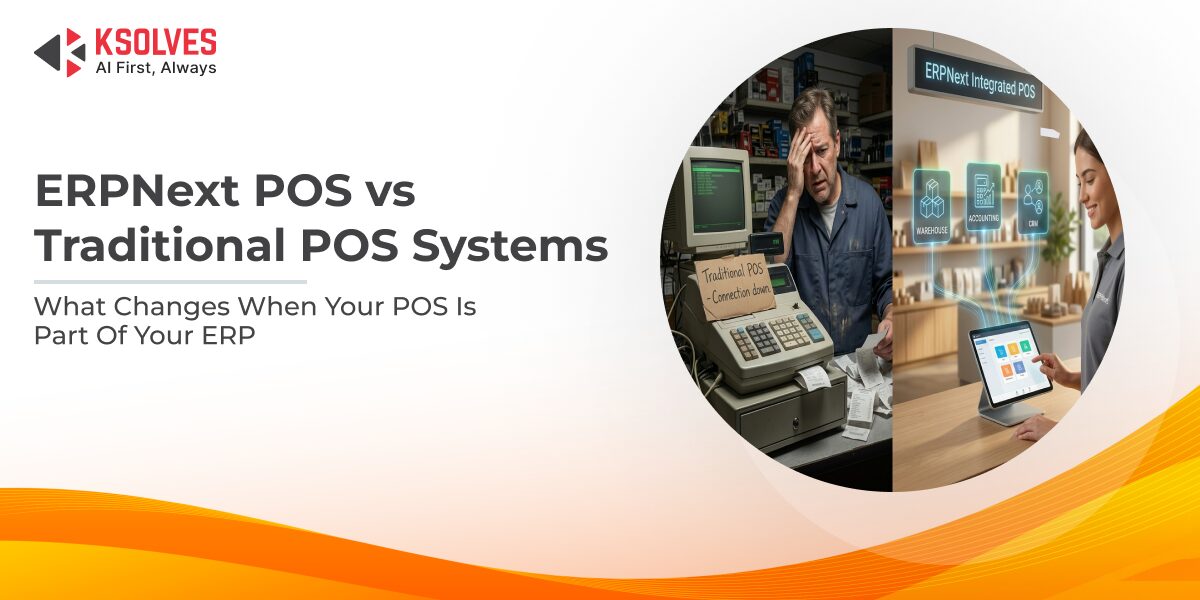
Most retailers do not replace their POS because the checkout stopped working. They replace it because the POS works fine at the counter but creates problems everywhere else:
- Inventory counts that do not match
- Accounting entries that need manual reconciliation at the end of every day
- Store managers who cannot see what is in stock at another location without making a phone call
The real question is not whether a POS can process transactions. Every POS can do that. The question is what happens to the data after the transaction is complete. That is where the gap between an ERP-integrated POS like ERPNext and a traditional standalone POS becomes operationally visible.
This blog breaks down exactly what changes when your POS is part of your ERP, where ERPNext POS has genuine advantages, where it has limitations, and what a migration actually looks like.
What “Traditional POS” Actually Means (and Where It Breaks Down)
A traditional POS (sometimes called a standalone or legacy POS) is a system built primarily to handle checkout: scan items, calculate totals, process payments, print receipts. Some traditional POS systems include basic inventory tracking or end-of-day sales reports, but they operate as isolated applications.
The common setup looks like this:
- A standalone POS handles billing at the counter.
- A separate accounting tool (Tally, QuickBooks, or spreadsheets) handles the books.
- Inventory is tracked manually, in a spreadsheet, or in a third tool that syncs with the POS periodically (often once a day).
- Customer data lives in the POS or in a CRM that is not connected to purchasing or inventory.
This setup works when a business has a single store, a small product catalogue, and an owner who personally oversees operations. It starts breaking down when any of these grow:
- Multiple stores mean inventory must be tracked across locations, and a standalone POS has no way to show consolidated stock.
- Higher transaction volume means end-of-day reconciliation takes longer and errors accumulate.
- Promotional pricing must be applied manually at each counter, with no central rule engine.
- Purchasing decisions are made without real-time sales data, because the POS and the buying team use different systems.
The failure is not in the POS itself. It is in the disconnection between the POS and every other part of the business.
Six Operational Differences Between ERPNext POS and a Standalone POS
ERPNext POS is not a separate product. It is a module inside ERPNext, the open-source ERP built on the Frappe Framework. That single architectural fact is what drives every operational difference listed below.
1. Inventory Updates: Real-Time vs End-of-Day
With a traditional POS, inventory is typically updated in batches (end of day or via periodic sync). Between updates, the stock data across your systems is stale. This is how a product shows “in stock” online while the shelf is already empty.
ERPNext POS updates stock at the moment of sale. When the “Update Stock” setting is enabled in the POS Profile, each completed transaction creates a Stock Ledger Entry immediately, reducing the item’s quantity in the assigned warehouse. No Delivery Note is required, and no batch sync runs overnight. The stock figure visible to the warehouse team, the purchasing team, and the e-commerce storefront is the same figure, updated in real time.
For retailers managing fast-moving SKUs across multiple locations, this eliminates the most common source of stock discrepancies: timing gaps between the sale and the stock update.
2. Accounting Entries: Automatic vs Manual Reconciliation
A standalone POS generates sales totals. Those totals are then entered manually into the accounting system. This handoff is where discrepancies enter: a missed entry, a transposed number, a forgotten return.
In ERPNext, every POS transaction creates a Sales Invoice automatically. At shift close, the POS Closing Entry consolidates the day’s transactions into optimised ledger postings (while retaining individual invoices for audit). The POS Opening and Closing Entry also compares expected cash against actual cash and logs variances. There is no separate reconciliation step between the POS and the general ledger because they are the same system.
3. Multi-Store Visibility: Consolidated vs Location-Blind
A traditional POS knows about one store. If a retailer operates five locations, each POS is an island. Checking stock at another branch means calling the store or logging into a separate system.
ERPNext maps each store to its own warehouse and POS Profile. A purchasing manager can open the Stock Balance report and see every location’s stock levels in a single view. If Store A is overstocked on a SKU and Store B is running low, a Material Request of type “Material Transfer” moves inventory between them through ERPNext’s standard workflow, without involving a supplier at all.
For a deeper look at how ERPNext handles multi-location inventory, reorder automation, and safety stock, read our blog on ERPNext for retail inventory management.
4. Promotions and Pricing: Rule-Based vs Manual Overrides
Traditional POS systems handle discounts one of two ways: the cashier manually applies a percentage at checkout, or the POS has a basic discount feature that must be configured at each terminal. Neither approach scales when a retail chain runs different promotions across locations, time periods, or customer groups.
ERPNext has a dedicated Promotional Scheme doctype and a Pricing Rule engine. Retailers can configure:
- Percentage or flat-amount discounts based on item, item group, or transaction value
- “Buy X Get Y Free” schemes with min/max quantity thresholds
- Time-bound promotions that activate and deactivate automatically by date
- Branch-specific promotions filtered by territory, customer group, or campaign (which can be linked to individual POS Profiles)
- Cumulative discounts that apply after a customer crosses a spending threshold over multiple transactions
These rules apply automatically at the POS counter. The cashier does not need to remember or manually enter them. ERPNext also supports a Loyalty Program with single-tier or multi-tier structures, where customers earn points on purchases and redeem them during POS checkout.
5. Customer Data: Shared Across the Business vs Trapped at the Counter
A standalone POS may store customer names and phone numbers, but that data stays at the counter. The marketing team, the buying team, and customer support do not have access to it, or they maintain their own separate records.
In ERPNext, customer records are shared across every module. A transaction completed at the POS counter appears in the customer’s profile alongside their Sales Orders, support tickets, outstanding invoices, and loyalty points. This is not a CRM integration bolted on to a POS. It is a single customer master used by every part of the business.
Must Read: How ERPNext POS Transforms Retail Operations
6. Reporting: Business-Wide vs Counter-Level Only
A traditional POS can tell you how much one register sold today. It cannot tell you which SKUs are slowing down across all locations, how current sales velocity compares to last quarter, or what the profit margin looks like after accounting for returns and discounts across the business.
ERPNext’s reporting spans the full business. From the POS data alone, retailers can pull Sales Analytics by item, territory, or customer group. Combined with the Stock Analytics report and the Demand Driven Forecasting report (which uses exponential smoothing on historical sales data), buying teams can identify demand trends and adjust procurement before stock-outs happen.
Where ERPNext POS Has Limitations Worth Knowing
ERPNext POS is strong, but being honest about its boundaries matters more than overselling it.
- Offline mode has evolved but needs attention: ERPNext POS supports offline billing where transactions are cached locally and synced when connectivity returns. However, the native offline capability has historically been a point of community discussion, and some high-volume retailers with unreliable internet opt for community apps like POS Awesome or POS Next for more resilient offline handling. The right approach depends on your network environment.
- The UI is functional, not flashy: ERPNext’s POS interface is browser-based, touchscreen-friendly, and supports barcode scanning and keyboard shortcuts. It is practical and fast. Retailers expecting a heavily polished, consumer-grade checkout experience may find it more utilitarian than some purpose-built POS applications. That said, the Frappe Marketplace offers enhanced POS apps that extend the default interface.
- Hardware integration is standard, not plug-and-play for all devices: ERPNext POS works with barcode scanners, receipt printers (ESC/POS), and cash drawers. But it does not have native drivers for every hardware vendor. Testing your specific hardware setup during implementation is essential.
- Safety stock is item-level, not warehouse-level: The Safety Stock field in the Item master is a single global value. Retailers who need different safety stock buffers at different store locations would need custom configuration (which Ksolves routinely handles during implementation).
Must Read: ERPNext for Retail Inventory Management: How to Prevent Stock-Outs Across Every Store
When a Traditional POS Still Makes Sense
Not every retailer needs an ERP-integrated POS. A standalone POS can be the right choice when:
- The business operates a single location with a small product catalogue.
- There is no need for real-time inventory tracking (for example, service-based businesses that happen to sell a few retail products).
- The business already has a well-functioning accounting and inventory system and does not want to replace it.
- The budget and team capacity for an ERP implementation are not available right now.
The shift to an ERP-integrated POS makes sense when the cost of disconnection (manual reconciliation, stock-outs from delayed data, inability to see across locations) starts exceeding the cost of implementation.
What a Migration from Standalone POS to ERPNext POS Actually Involves
Moving from a traditional POS to ERPNext POS is not a POS swap. It is an ERP implementation where the POS is one of the modules being configured. That distinction matters because the scope includes inventory setup, accounting configuration, warehouse mapping, and user training, not just installing a new checkout screen.
A typical migration involves:
- Current-state mapping: Documenting existing POS workflows, payment methods, discount logic, and how data currently flows (or does not flow) between the POS, inventory, and accounting.
- Item and pricing setup: Migrating the product catalogue into ERPNext’s Item master, configuring Price Lists (which can be store-specific), and setting up Promotional Schemes.
- Warehouse and POS Profile configuration: Creating warehouse records for each store, configuring POS Profiles with location-specific defaults (warehouse, payment modes, tax templates, user permissions).
- Accounting structure: Mapping the Chart of Accounts, configuring tax templates, and setting up the POS Opening and Closing Entry workflow.
- Reorder and safety stock rules: Defining reorder levels per item per warehouse and setting safety stock values in the Item master so that automated Material Requests keep shelves stocked.
- Testing and training: Running parallel operations, validating that stock updates, accounting entries, and reports work correctly, and training cashiers and managers on the new system.
Ksolves’ ERPNext consulting services cover this end to end: from the initial workflow audit through to go-live and post-deployment support.
Conclusion
A POS that only handles checkout is a cash register with a screen. A POS that is part of your ERP is the system every other function draws from: every transaction updates inventory, posts to the ledger, informs purchasing decisions, and builds a unified view of your customer.
ERPNext POS is not the right fit for every retailer. But for businesses where disconnected systems are costing them stock accuracy, reconciliation hours, and purchasing visibility across stores, it eliminates those gaps by design, not by integration.
Ready to evaluate whether ERPNext POS fits your retail operation? Ksolves’ certified ERPNext experts can audit your current POS and inventory workflows, identify the gaps, and design an implementation built around how your stores actually run. Talk to our ERPNext team to get started.































AUTHOR
ERPNext
Share with