



How to Migrate from Clio to Salesforce (2026 Guide)
Salesforce
5 MIN READ
June 11, 2026

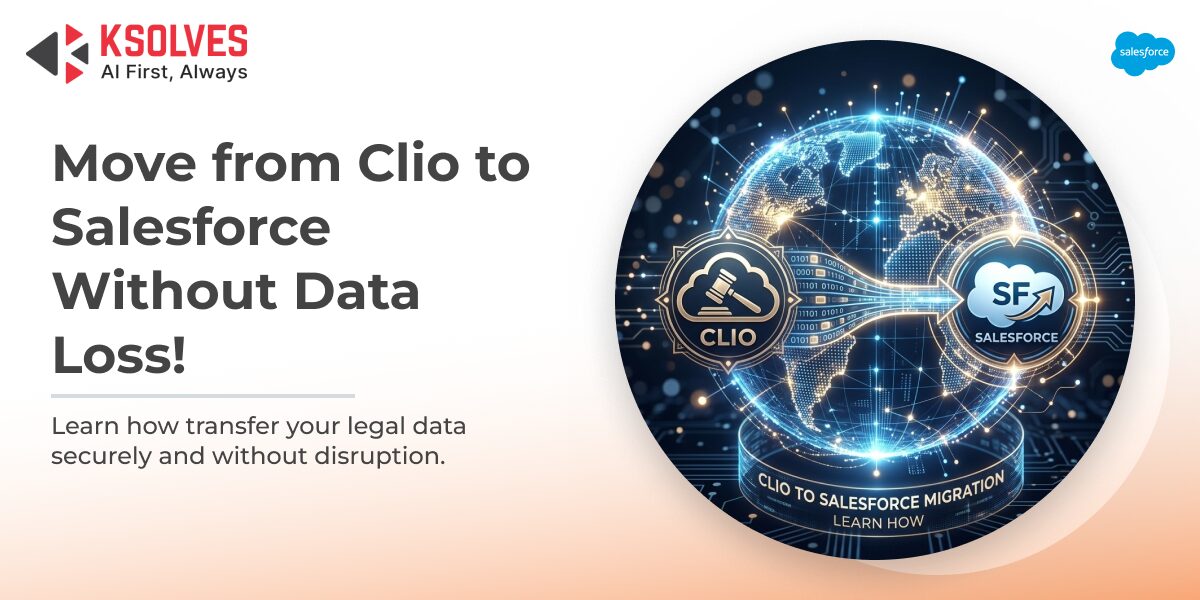
Clio is purpose-built for legal practice management. It handles case tracking, time entry, billing, and client communication well. But it has a ceiling.
As firms grow, they outgrow what Clio can do. They need custom intake workflows, AI-powered analytics, cross-department reporting, and deep integrations with marketing and finance tools. Salesforce is built for exactly that scale.
Consider what Salesforce brings to the table for law firms. According to the Salesforce report, firms that implement Salesforce report greater employee productivity, increased customer satisfaction, and measurable improvement in sales revenue. For law firms, this translates to faster client intake, smarter business development, and tighter matter management.
Salesforce also gives firms access to Agentforce, which automates routine client interactions and updates records autonomously, freeing attorneys to focus on billable work rather than administrative tasks.
The business case for migrating is strong. The execution is where firms need to be careful.
What Data Lives in Clio and What Needs to Move
Before any migration begins, you need a clear inventory of what you are moving. Clio stores data across several interconnected areas:
- Contacts and Clients: Every person and organization your firm has worked with. These become Contacts and Accounts in Salesforce.
- Matters: The core of your Clio data. Matters are Clio’s equivalent of cases. In Salesforce, these typically become custom objects mapped to your firm’s specific workflow.
- Billing Records: Time entries, invoices, expenses, and payment history. These require careful transformation because Clio’s billing schema does not map directly to standard Salesforce objects.
- Documents and Notes: Correspondence, contracts, case notes, and uploaded files. Documents are often migrated to Salesforce’s Files system or a connected document management tool.
- Calendars and Tasks: Deadlines, court dates, reminders, and follow-up tasks. These map to Salesforce Activities (Tasks and Events).
- Automations and Workflows: Any triggers, reminders, or rules you have built in Clio. These need to be recreated in Salesforce Flow.
Not all of this data is clean. Most law firms have years of Clio records with inconsistencies: duplicate contact entries, outdated billing records, and incomplete matter notes. Cleaning this data before migration is not optional. Migrating bad data into Salesforce creates exactly the same problems in a more expensive system.
Step-by-Step: How the Clio-to-Salesforce Migration Works
Moving your data from Clio to Salesforce follows a structured sequence. Skipping any step increases the risk of data loss, broken relationships, or a failed go-live.
Step 1: Audit Your Clio Data
Export your data from Clio and review it carefully. Look for duplicate contacts, incomplete matter records, orphaned billing entries, and inconsistent field formats. This audit shapes your entire migration plan. Choosing the right Salesforce data migration tools – from Data Loader for bulk transfers to DemandTools for deduplication – determines how cleanly your Clio records land in Salesforce.
Tools to use: Clio’s built-in export function exports matters, contacts, billing, and time entries as CSV files. Documents require a separate export process.
Step 2: Define Your Salesforce Data Model
Clio’s data model is legal-specific. Salesforce is a general-purpose CRM. You need to decide how Clio concepts translate into Salesforce objects before you move a single record.
A standard mapping looks like this:
| Clio Object | Salesforce Object |
| Client (Person) | Contact |
| Client (Organization) | Account |
| Matter | Custom Object (e.g., Legal Matter) |
| Invoice | Custom Object or third-party app |
| Time Entry | Custom Object or Activity |
| Document | Salesforce File / Content |
| Task / Deadline | Task (Activity) |
| Relationship (Client-Matter) | Lookup Relationship |
This mapping document is your migration blueprint. Every field in Clio needs a corresponding field in Salesforce. Where no direct match exists, you define the transformation rule.
Step 3: Clean Your Data
Before loading anything into Salesforce, clean your exported Clio data. This means:
- Deduplicating contact records
- Standardizing name formats, phone number formats, and address formats
- Filling in required fields that Salesforce enforces but Clio does not
- Removing records that are no longer relevant (closed matters from 10 years ago, for example, may be better archived than migrated)
Poor data quality is the single most common cause of Salesforce migration failures. Garbage in, garbage out applies completely here.
Step 4: Set Up Your Salesforce Environment
Before any data moves, your Salesforce org needs to be configured. This includes:
- Creating custom objects and fields to match your data model
- Setting up record types, page layouts, and list views
- Configuring roles, profiles, and permission sets
- Building the automation logic that will replace Clio’s workflows
This step often takes longer than firms expect. It is the foundation of your new system, and it has to be right before data migration begins.
Step 5: Run a Trial Migration
Load a subset of your Clio data (typically 5 to 10% of records) into a Salesforce sandbox environment. This is your proof-of-concept. Validate:
- Are all records created correctly?
- Are relationships (contact to matter, for example) linking as expected?
- Are the required fields populating?
- Are any records failing or creating errors?
Fix any issues found before proceeding to full migration.
Step 6: Migrate in the Right Order
Data dependencies matter. If you load matters before contacts, the matter records will have no one to link to. The correct migration order is:
- Accounts (Organizations)
- Contacts (Individuals)
- Legal Matters (Custom Object)
- Billing Records and Time Entries
- Documents and Files
- Tasks and Events
- Historical Notes and Communications
Step 7: Validate and Go Live
After full migration, validate data completeness and accuracy with your key users. Compare record counts, spot-check critical matters, and confirm that automations fire correctly. When validation is complete, you are ready to go live.
Post-go-live support for the first 30 to 60 days is essential. Users will have questions, edge cases will surface, and minor data issues will need correction.
How to Avoid the Most Common Data Loss Risks
Most data loss in Clio-to-Salesforce migrations does not happen during the actual transfer. It happens because of poor preparation.
Risk 1: Skipping the data audit. If you do not know what you have in Clio, you cannot migrate it correctly. Firms that skip the audit routinely discover missing records after go-live.
Risk 2: Incorrect field mapping. Mapping a Clio text field to a Salesforce picklist without defining valid values will cause records to fail silently. Every field mapping needs to be tested.
Risk 3: Missing relationship records. Salesforce is a relational database. Parent records must exist before child records load. A matter with no linked contact cannot be linked after the fact without manual effort.
Risk 4: Migrating without a sandbox test. A direct production migration with no sandbox trial is one of the highest-risk approaches possible. Always test in a sandbox first.
Risk 5: No rollback plan. Things go wrong. Before going live, have a documented rollback plan that defines exactly how you will restore from backup if the migration fails.
How Ksolves Delivers Value in Clio-to-Salesforce Migrations
Ksolves is a Salesforce Summit Partner with 100+ certified Salesforce professionals and more than 350 Salesforce certifications. As an AI-first implementation partner, Ksolves brings both the Salesforce expertise and the AI-accelerated delivery methodology that law firm migrations demand.
What Ksolves does differently:
- Data audit and mapping with precision. Ksolves’ AI-enabled Salesforce developers use AI-assisted code review and validation tools to surface data quality issues early in the migration cycle, before they become production problems. This reduces rework significantly compared to manual audit approaches.
- Custom object design for legal workflows. Ksolves does not apply a generic Salesforce template to every migration. They design custom objects, fields, and relationships that match how your firm actually works, whether you are running a personal injury practice or a corporate law department.
- Phased migration with zero-downtime delivery. Ksolves uses a phased migration approach that keeps your Clio system operational while Salesforce is being built and tested. Your firm does not lose access to case data during the transition.
- AI-powered project delivery. Ksolves uses AI-powered project dashboards to track migration milestones in real time, giving firm stakeholders clear visibility into progress without needing to chase status updates. This AI-accelerated workflow typically delivers migrations 50% faster than traditional implementation timelines.
- Post-go-live support. Ksolves provides dedicated Salesforce support in the weeks following go-live, handling edge cases, user questions, and any data corrections that emerge after launch.
Firms that have worked with Ksolves on Salesforce data migration projects consistently report structured, on-time delivery backed by certified expertise. You can explore Ksolves’ full Salesforce migration services to understand the complete scope of support available.
Conclusion
Moving from Clio to Salesforce is not just a data transfer. It is a transformation in how your firm manages client relationships, tracks matters, and scales operations. Done correctly, it gives your firm a CRM platform that grows with you, one powered by AI-driven analytics, flexible automation, and the world’s largest CRM ecosystem.
The firms that succeed in this migration share a few things in common: they audit before they migrate, they map fields carefully, they test in a sandbox, and they work with partners who know Salesforce deeply.
Ksolves brings all of that to the table. As an AI-first company, Ksolves combines Salesforce implementation expertise with AI-accelerated delivery to move law firms from Clio to Salesforce efficiently, accurately, and without data loss. Firms that have engaged Ksolves report 20 to 30% cost savings on implementation compared to traditional approaches, driven by leaner workflows and fewer revision cycles.
If your firm is evaluating a legal CRM migration, the right time to plan is now. So, contact our experts today.
Frequently Asked Questions
What data from Clio needs to be migrated to Salesforce?
How long does a Clio to Salesforce migration typically take?
What are the biggest risks of migrating from Clio to Salesforce?
Can Salesforce replace all of Clio’s functionality for a law firm?
Do law firms need a Salesforce partner for a Clio migration?
What Salesforce objects are used to replace Clio matters?
How much does a Clio to Salesforce migration cost?
Still have questions? Contact our team for a free migration consultation.































Author
About the Author Editorial Team The Ksolves Editorial Team includes certified Salesforce experts, Big Data engineers, AI/ML specialists, Zoho consultants, and experienced technology writers focused on delivering clear, actionable insights for modern businesses. With hands-on experience across Salesforce, Big Data platforms, AI/ML solutions, application development, software testing, and Zoho ERP/CRM, the team publishes practical guides, real-world use cases, and industry updates that support smarter decisions and faster growth. Every article is created to solve business challenges, guide technology adoption, and keep organizations aligned with evolving digital ecosystems.
Share with