
How Ksolves Reduced KPI Generation Time by 95% for a Telecom Provider with UiPath Automation

For a leading telecommunications provider, generating KPIs was eating up hours every single day. Each cluster or band combination required 2 to 3 hours of manual work: pulling data, transforming it, compiling reports, and checking for errors. The team was always behind, working with outdated numbers and spending most of their time on repetitive data tasks instead of acting on insights.
The client manages a large network infrastructure across multiple clusters and frequency bands. Their operations team monitored performance metrics daily, but the manual process meant decisions were always made on stale data. Errors crept in at every step, reports had to be rerun, and as the network grew, the workload kept getting heavier.
Ksolves, an AI-first company, was brought in to automate the entire KPI pipeline from end to end, turning a 2 to 3 hour manual process into something that runs in minutes, around the clock, without any human involvement.
Key Challenges
The client came to Ksolves with five problems that were slowing down their network operations team:
01
KPI Generation Took 2 to 3 Hours Per Cluster: Every cluster or band combination required a full manual process from data extraction to report output. With dozens of combinations to process, the team spent most of their day on data work and had little time left for anything else.02
Manual Steps Caused Frequent Errors: Data entry, transformations, and report compilation all depended on human input. Errors were common, reports had to be redone, and the team could not trust the numbers without checking them first.03
Data Was Spread Across Disconnected Tools: Files sat in different locations and had to be moved manually between systems. There was no central workflow, no audit trail, and no consistency from one run to the next.04
The Process Could Not Scale: As the network grew and data volumes increased, the manual approach required more and more time. Adding new clusters or bands made the problem worse, not better.05
The Team Was Always Working on Old Data: Because KPIs were generated in batches through a slow manual process, the operations team was always making decisions based on data that was hours old. Real-time visibility was not possible.Our Solution
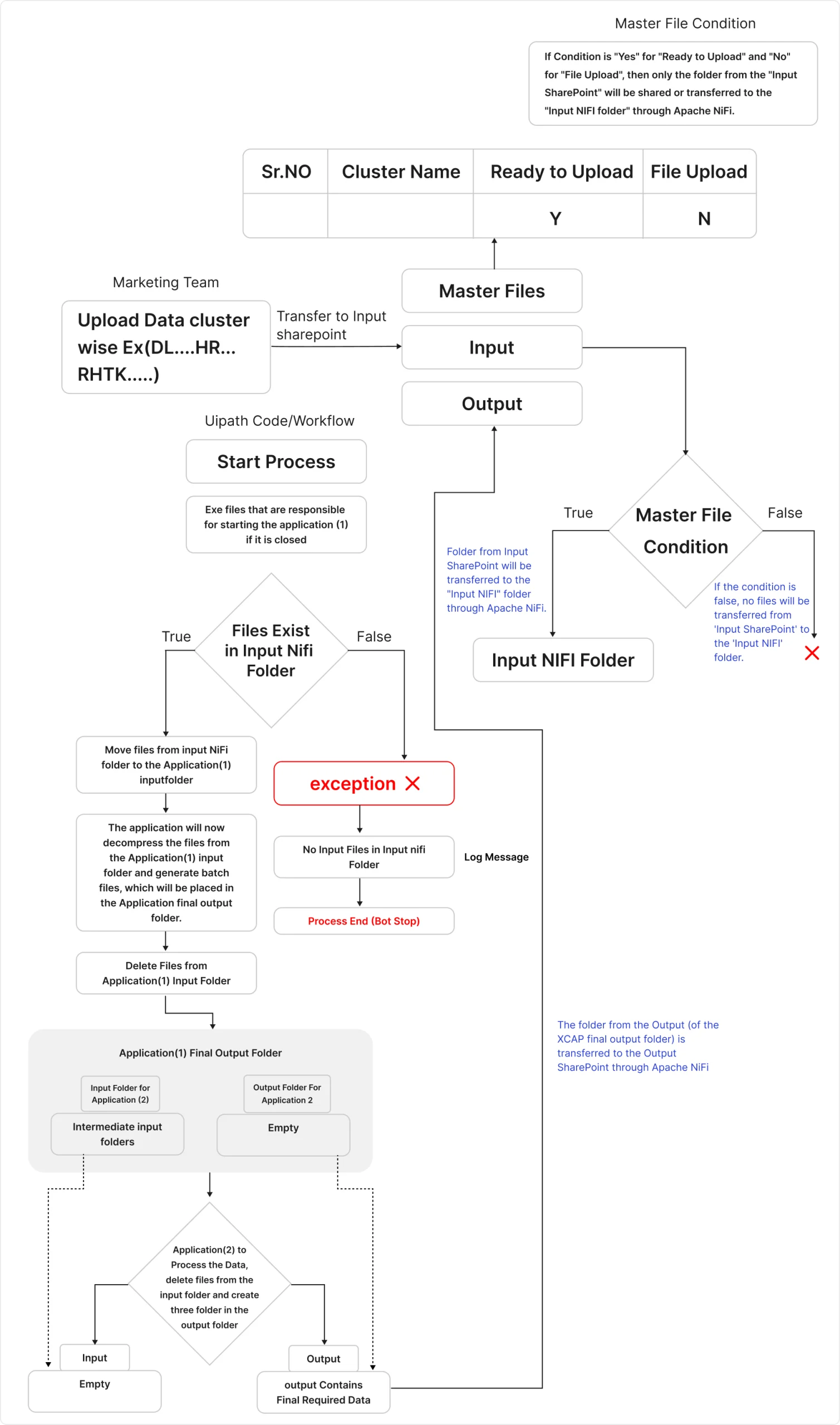
Ksolves designed and built an end-to-end automation solution with its UiPath services, Apache NiFi, and Microsoft SharePoint. The goal was simple: remove every manual step from the KPI pipeline so the process runs automatically, accurately, and continuously.
- 01 Data Upload to SharePoint: The client uploads raw network data files to a designated SharePoint location. This is the only step that requires any human action. Everything after this point is fully automated.
- 02 Automated Transfer with Apache NiFi: NiFi monitors the SharePoint location and automatically picks up new files as soon as they arrive. It transfers the data to a Virtual Machine where the UiPath automation is running, without any delays or manual handoffs.
- 03 UiPath Automation for KPI Generation: Once the data lands on the VM, the UiPath bot takes over. It performs all the data transformations, runs the calculations, and generates the KPIs automatically. No manual steps, no human intervention, no errors from data entry.
- 04 Output Delivered Back to SharePoint: As soon as the KPIs are generated, the automated solution places the output files back into the SharePoint location. The operations team can access the latest performance metrics at any time, always up to date.
Data flow diagram
Technology Stack
| Component | Details |
|---|---|
| Automation Platform | UiPath (RPA) |
| Data Integration | Apache NiFi |
| File Storage | Microsoft SharePoint |
| Processing Environment | Virtual Machine (VM) |
| Data Type | Telecom network KPI datasets (cluster and band level) |
| AI Tooling | AI-assisted workflow design and automation mapping |
The automation delivered clear, measurable improvements across speed, accuracy, scalability, and operational efficiency:
- 95% Reduction in KPI Generation Time: Processing time dropped from 2 to 3 hours per cluster and band combination to under 10 minutes. The team no longer spends most of their day on data work.
- 90% Reduction in Data Errors: Removing manual data entry and transformation steps eliminated the most common sources of errors. KPIs are now accurate the first time, every time, with no rework needed.
- 3x More Data Handled Without Extra Headcount: The automated solution handles three times the previous data volume with no additional staff. As the network grows, the system scales with it automatically.
- 24/7 KPI Generation With No Manual Oversight: The process now runs around the clock without anyone managing it. The operations team focuses on analyzing insights instead of producing them.
- 60% Faster Decision-Making: With up-to-date KPIs available on demand instead of hours later, the network operations team can respond to performance issues significantly faster than before.
Client Testimonial
“Before this automation, our team spent most of their day just producing KPIs. Now the data is ready before they start their shift. The accuracy improvement alone was worth it, but the time savings changed how the whole team works.”
— Head of Network Operations, Leading Telecommunications Provider
Conclusion
Before this project, the client’s network operations team was stuck in a cycle of manual data work that left them always behind and always reacting. Ksolves, with its AI-first delivery approach, replaced that cycle with a fully automated pipeline that generates accurate KPIs in under 10 minutes, runs 24×7, and scales with the business.
Processing time is down 95%, data errors are down 90%, and the operations team now spends their time on decisions instead of data entry. As the client’s network grows and data volumes increase, the automation scales with them.
If your team is still spending hours on manual reporting that should take minutes, Ksolves Big Data and Automation experts can help you build the right solution. Reach out at [email protected] to get started.