 Big Data
  5 MIN READ


Migrating a MySQL database seems simple, like moving the data, validating the setup, and resuming operations. But in reality, database migrations are very complicated and need expertise. Even minor oversights can result in unexpected downtime, data inconsistencies, application failures, and unnecessary pressure on technical and business teams.
Whether you want to upgrade from a newer MySQL version, move workloads to the cloud, or transition to a new infrastructure, migration failures are common. In this blog, we explore the common MySQL migration challenges and how professional experts can help you with this.
What is MySQL Migration?
MySQL migration is defined as a process of migrating a MySQL database from one environment to another one. This could involve upgrading to a newer MySQL version, shifting databases from on-premises infrastructure to the cloud, or migrating from MySQL to a different database platform altogether. During MySQL migration, we need to ensure that data, schemas, and database objects are efficiently transferred without impacting the application functionality, performance, and data integrity.
Common MySQL Migration Challenges
Here are some common challenges in MySQL migration:
Data Loss During Migration
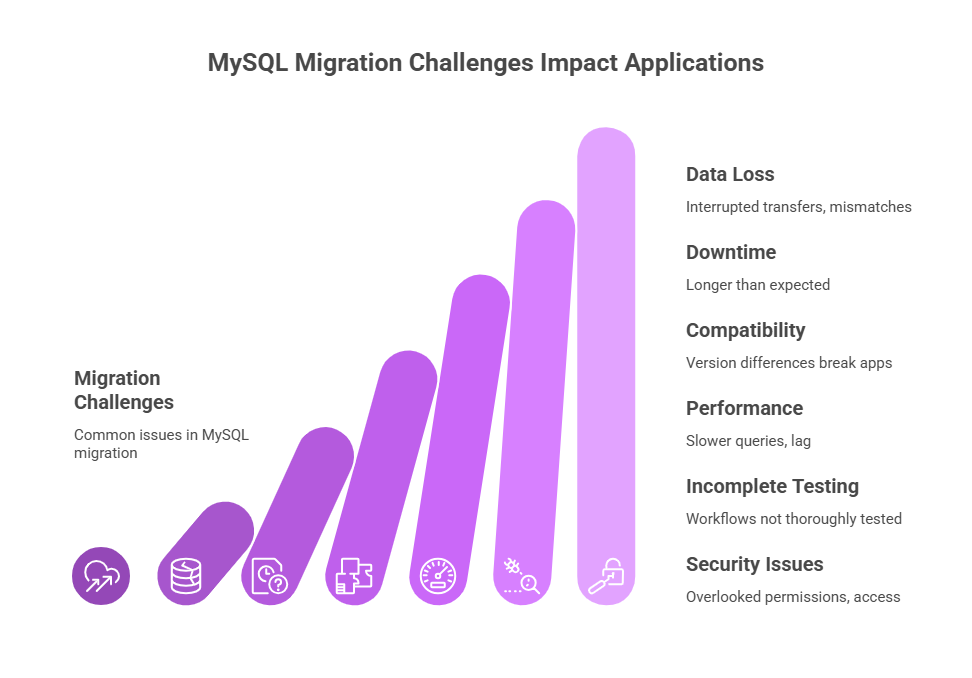
Data loss is the most common issue that comes with any migration. It can happen due to interrupted transfers, incompatible data types, character set mismatches, or overlooked tables.
Downtime Longer Than Expected
Many migrations are planned with optimistic timelines. When things take longer than expected, applications remain offline, business operations slow down, and pressure mounts quickly. This often happens because:
- The database size was underestimated
- Network bandwidth wasn’t sufficient
- Testing was rushed or skipped
Compatibility and Version Issues
MySQL versions don’t always behave the same way. Differences in SQL syntax, storage engines, default settings, or deprecated features can break applications after migration.
Queries that worked perfectly in an older MySQL version may fail or behave differently in a newer one, leading to subtle bugs that are hard to trace.
Performance Degradation After Migration
Sometimes the migration “works,” but the application process is slower than before. Queries that once ran smoothly start timing out, dashboards load slowly, and users complain about lag. This often happens due to:
- Missing indexes
- Different hardware or cloud configurations
- Changed buffer or memory settings
Incomplete Testing
One of the key reasons for migration failure is insufficient testing. Teams validate that the database is “up,” but don’t thoroughly test real application workflows. The missing testing process can lead to reports failing, background jobs crashing, or edge-case queries returning incorrect results.
Security and Access Issues
Generally, settings are overlooked, such as user permissions, roles, and authentication. After migration, it may lead to application issues like failure to connect data, or users may suddenly have more (or less) access than intended. This isn’t just inconvenient—it can also be a serious security risk.
MySQL Migration with Ksolves Experts
If you are struggling with MySQL migration challenges and looking for trusted MySQL data migration professionals, then Ksolves is here to support you. We understand that your data is critical to day-to-day operations, and that’s why our experts follow a step-by-step approach to MySQL migration.
From evaluating your existing database and cleaning up inconsistencies to ensuring secure transfer and validating data post-migration, Ksolves focuses on making the transition smooth and hassle-free. We aim to help you by ensuring safe and secure MySQL data migration with no data loss and setting up a more reliable and scalable foundation for your business. As part of Ksolves’ broader big data consulting services, our team pairs migration expertise with ongoing database performance tuning.
Conclusion
MySQL migration challenges, like data loss, unexpected downtime, performance drops, or security gaps, are often caused by rushed timelines, incomplete testing, or skipping critical validation steps. But with proper backups, thoughtful planning, compatibility checks, thorough testing, and post-migration performance tuning, a migration can be controlled and predictable rather than stressful. If you want to enjoy a smooth MySQL migration, then Ksolves experts can help you.
FAQs
What is MySQL migration?
MySQL migration is the process of moving a MySQL database from one environment to another — for example, upgrading to a newer MySQL version, shifting from on-premises infrastructure to the cloud, or switching to a different database platform. The goal is to transfer data, schemas, and database objects without disrupting application functionality or performance.
What causes data loss during a MySQL migration?
Data loss during a MySQL migration is usually caused by interrupted transfers, incompatible data types, character set mismatches, or tables that get overlooked during planning. Ksolves addresses this by cleaning up inconsistencies and validating data before and after transfer, rather than relying on a single copy pass.
How can a team avoid downtime during a MySQL migration?
Avoiding downtime starts with accurately sizing the database and network bandwidth requirements upfront, since underestimating either is the most common cause of migrations running long. Thorough pre-migration testing of real application workflows, not just confirming the database is “up,” also catches issues before they cause an outage.
Should I upgrade to a newer MySQL version or move to a different database?
It depends on why the current setup is struggling: version upgrades fix compatibility and feature gaps within MySQL, while switching platforms (such as PostgreSQL or MongoDB) makes sense when the workload itself no longer fits a relational or single-engine model. Reviewing SQL syntax differences, storage engines, and deprecated features against your application is the first step either way.
How long does a MySQL migration typically take?
Timelines vary with database size, network bandwidth, and how much testing the workflows require, which is exactly why “optimistic” schedules are the most common reason migrations run over. A realistic plan builds in time for compatibility checks, a full test pass on real workflows, and post-migration performance tuning rather than just the data transfer itself.
Who should handle a MySQL migration for a business-critical system?
Business-critical MySQL migrations are best handled by a team with hands-on experience across data validation, security configuration, and performance tuning, since a single missed permission or index can cause outages or access issues after go-live. Ksolves’ database experts follow a step-by-step process — evaluation, cleanup, secure transfer, and post-migration validation – to keep the transition predictable.
What steps reduce the risk of MySQL migration failure?
The main risk reducers are proper backups, realistic timeline planning, compatibility checks against the target MySQL version or platform, thorough testing of real workflows, and performance tuning after the migration completes. Ksolves builds each of these into its MySQL migration engagements so that the process stays controlled rather than reactive.
Still have questions about migrating your MySQL database? Contact our team.


 Anil Kushwaha