



AI-Assisted Salesforce Engineering: Claude, Code Coverage and Review Guardrails for Apex & LWC
Salesforce
5 MIN READ
October 27, 2026

AI assistants like Claude can now write Apex classes, test suites and Lightning Web Components in minutes. The real question for Salesforce teams is no longer can AI write the code, but how do we make sure what it writes is safe to deploy. The answer is a set of guardrails: meaningful test coverage, automated static analysis and a human review gate that AI never bypasses.
Every Salesforce developer knows the number 75. It is the minimum org-wide Apex test coverage required to deploy to production, and for years it has quietly shaped behaviour. Teams under deadline pressure write tests that execute lines without asserting anything, push coverage just past the line and move on. The platform is satisfied. The business is not.
AI changes the economics of this problem. Writing thorough tests, bulk scenarios and negative paths used to be the work that got cut. With an assistant that can draft them in seconds, there is no longer an excuse to skip them.
But AI also introduces a new risk: code that looks idiomatic, compiles cleanly and still ignores governor limits, field-level security or sharing rules. This post lays out a practical model for getting the speed without inheriting the risk.
Where Claude Fits in the Apex and LWC Lifecycle
Claude adds the most value where work is repetitive, pattern-heavy or easy to skip under pressure. It adds the least where the decision depends on business context only your team holds.
| Stage | What Claude Does Well | What Stays With Your Engineers |
|---|---|---|
| Design | Drafts trigger-handler and service-layer structures, suggests selector patterns, explains trade-offs between Queueable, Batch and Platform Events | Choosing the data model, sharing model and integration boundaries |
| Apex Build | Generates bulkified handlers, SOQL selectors, custom exceptions and boilerplate wrappers | Deciding business rules, order of execution and automation ownership (Flow vs Apex) |
| LWC Build | Scaffolds components, wire adapters, @api contracts, event handling and SLDS markup | UX decisions, accessibility sign-off and component reuse strategy |
| Testing | Writes Apex test classes with test data factories, bulk and negative cases; writes Jest tests for LWC | Defining what “correct” means for each business rule |
| Review | Pre-reviews diffs for governor limits, security gaps and anti-patterns before a human sees them | Final approval and merge |
| Legacy Work | Explains undocumented classes, proposes refactors, identifies dead code | Prioritising technical debt against delivery |
In practice, teams use Claude in three modes. In chat, it explains code and drafts snippets. In the IDE or terminal through Claude Code, it works directly in the SFDX project, runs Salesforce CLI commands and iterates on failing tests. In CI, it acts as a first-pass reviewer on pull requests. Each mode needs the same guardrails.
Code Coverage Done Right: Assertions, Not Percentages
Ask any model to “get this class to 90% coverage” and it will happily do so, often by calling methods with minimal data and never checking the result. Your prompt must ask for behaviour, not a number.
What a Good AI-Generated Apex Test Looks Like
Instruct Claude to follow a fixed testing contract on every class:
- Use a test data factory and
@TestSetupso data creation is consistent and never relies onSeeAllData=true. - Test in bulk, with 200 records, so that SOQL or DML inside a loop fails the test rather than production.
- Wrap the action in
Test.startTest()andTest.stopTest()to get a fresh set of governor limits and force async work to complete. - Run as a realistic user with
System.runAs()to prove sharing and permission behaviour, not just admin behaviour. - Assert outcomes with the
Assertclass, including at least one negative path that expects an exception or a validation failure.
Jest Coverage for Lightning Web Components
The 75% rule does not apply to LWC, which is exactly why component tests get skipped. Claude is effective at writing sfdx-lwc-jest tests because the patterns are predictable: mock the Apex method or wire adapter, render the component, dispatch events and assert on the DOM.
Ask it to cover three states for every data-bound component: loading, success and error. Then enforce a Jest coverage threshold in the project’s Jest configuration so the pipeline fails when coverage drops.
Review the Tests Themselves
A quick human check catches most weak AI tests. Look for tests with no assertions, assertions that compare a value to itself, tests that only use admin context, and single-record tests on trigger logic. A simple CI rule that flags test methods without an Assert call removes the worst offenders automatically.
Want Apex and LWC Code That Is Tested, Reviewed and Ready to Deploy?
Review Guardrails: Four Layers Between AI Output and Production
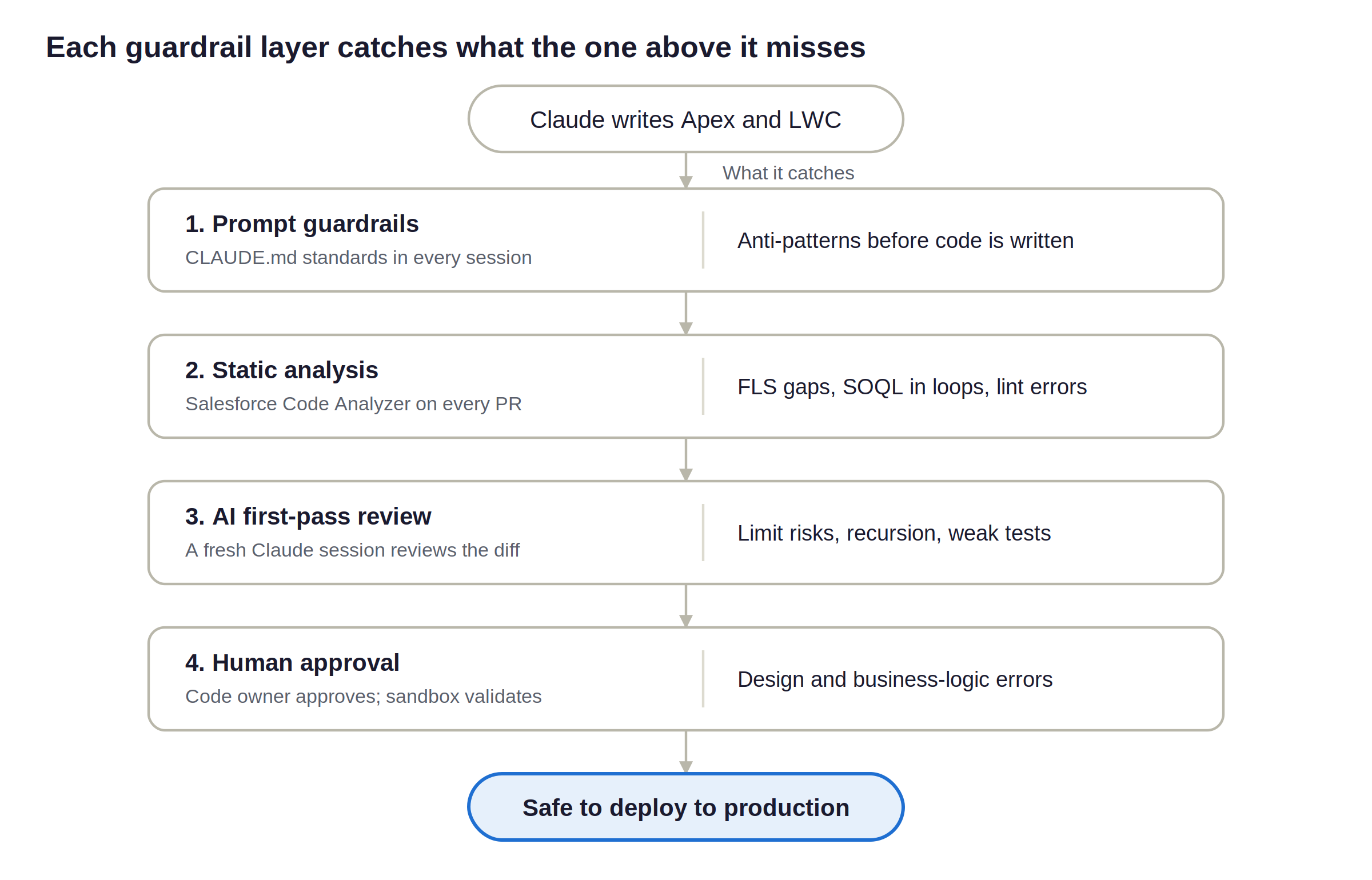
No single check is enough. Effective teams stack four layers, each catching what the previous one misses.
Layer 1: Guardrails in the Prompt
The cheapest fix is the one that never needs fixing. Keep a shared project instruction file (for Claude Code, a CLAUDE.md file at the repository root) that every session reads. It should state your non-negotiables:
- No SOQL or DML inside loops; all triggers go through the handler framework.
- Queries and DML run in user mode, or results pass through
Security.stripInaccessible(). - Classes declare sharing explicitly; “without sharing” requires a written justification in the class header.
- Dynamic SOQL uses bind variables only, never string concatenation of user input.
- No hardcoded record IDs, endpoints or credentials; use Custom Metadata and Named Credentials.
- Every new class ships with a test class that meets the testing contract above.
Layer 2: Automated Static Analysis
Run Salesforce Code Analyzer on every pull request. It bundles PMD rules for Apex, ESLint for LWC and JavaScript, and graph-based analysis that can trace CRUD and FLS violations across method calls.
Configure it to fail the build on high-severity findings rather than just report them. AI-generated code tends to pass compilation and fail static analysis, which makes this layer especially valuable.
Layer 3: AI as First-Pass Reviewer
Use Claude a second time, in a separate session with a reviewer prompt, to examine the diff. A fresh context reviews more critically than the session that wrote the code. Ask it to check specifically for governor limit exposure, missing security enforcement, recursion risk in triggers, unhandled async failures and weak tests.
Its comments land on the pull request before a human opens it, so human reviewers spend their time on design and business logic rather than syntax.
Layer 4: Human Approval, Always
Branch protection should require at least one human approval from a developer who owns that area of the org, plus a passing validation deployment to a scratch org or sandbox. For changes touching sharing, integrations or financial data, require a second reviewer. This is the layer that keeps accountability with people.
A Reference Pipeline for AI-Assisted Salesforce Delivery
Put together, the four layers form a pipeline where AI speeds up every stage but no stage can be skipped.
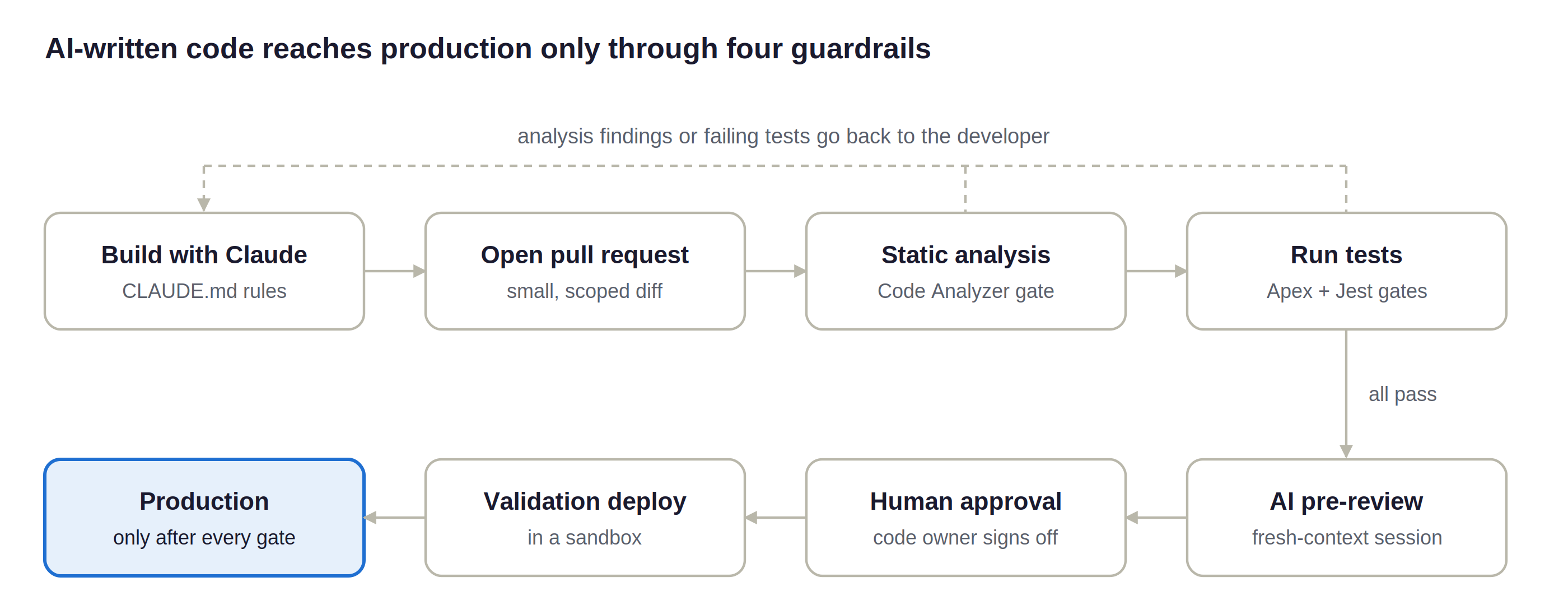
Automated gates run first and send failures straight back to the developer, so reviewers only see code that already compiles, passes analysis and meets coverage thresholds. If the human reviewer requests changes, the pull request re-enters the pipeline from the start.
This pipeline runs on standard tooling: Salesforce CLI, Salesforce Code Analyzer and your existing CI platform, whether that is GitHub Actions, GitLab CI, Azure DevOps or Jenkins.
Pitfalls to Watch For
Most AI-assisted Salesforce failures follow a handful of recognisable patterns.
- Coverage padding. Tests that execute code without asserting behaviour. The fix is the testing contract and an automated no-assertion check.
- Plausible but outdated APIs. Models sometimes suggest older patterns, such as manual
isAccessible()checks where user-mode operations are now cleaner, or deprecated LWC lifecycle usage. Pin your API version and state preferred patterns in the project instructions. - Ignoring existing automation. Claude cannot see the Flows, validation rules and managed package triggers on an object unless you give it that context. New Apex can collide with them. Retrieve the relevant metadata into the project or describe it in the prompt.
- Sharing and security blind spots. “Without sharing” and system-mode queries appear in generated code more often than they should. Static analysis and the human reviewer must treat these as red flags.
- Sensitive data in prompts. Never paste production records, customer PII or credentials into a prompt. Use anonymised sample data and keep org credentials out of the AI’s working context.
- Reviewer fatigue. When AI produces more code, humans review more code. Keep pull requests small so review stays meaningful.
Getting Started: A 30-Day Adoption Checklist
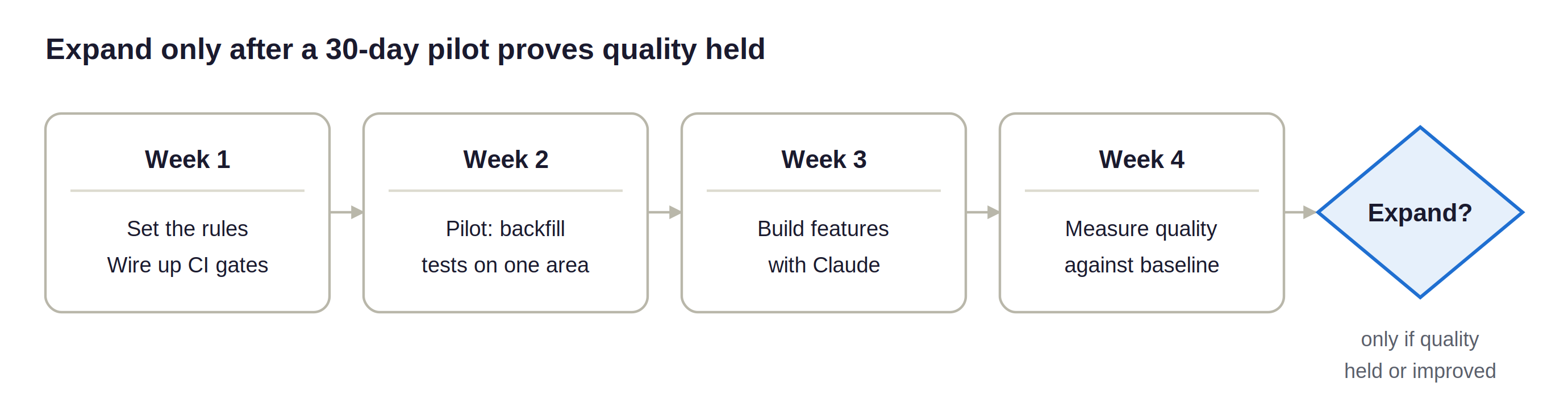
Start small, measure, then widen the scope. A pilot on one team and one module surfaces the gaps before they spread.
1. Week 1: Set the Rules
Write the project instruction file with your coding standards, security rules and testing contract. Agree on what AI may and may not do in your org.
2. Week 1: Wire Up the Pipeline
Add Salesforce Code Analyzer, Apex test runs and LWC Jest to CI with failing thresholds. Turn on branch protection with mandatory human approval.
3. Week 2: Pilot on Tests First
Use Claude to backfill meaningful tests for one high-risk, low-coverage area. This is low-risk, high-value work and builds team confidence.
4. Week 3: Extend to New Development
Let the pilot team build new Apex and LWC features with Claude, using the four-layer review model.
5. Week 4: Measure and Decide
Compare cycle time, static analysis findings per pull request, defects found in UAT and test assertion density against your baseline. Expand only if quality held steady or improved.
Track quality metrics alongside speed metrics from day one. Speed gains are easy to see; quality regressions show up weeks later in production.
Conclusion: Speed Is the Easy Part
AI-assisted engineering will make every Salesforce team faster. Whether it makes them better depends entirely on the guardrails around it.
Teams that pair Claude with a strict testing contract, automated static analysis, an AI first-pass review and mandatory human approval get the best of both: features delivered sooner, with fewer defects reaching users. Teams that skip the guardrails simply ship risk faster.
































Author
About the Author Editorial Team The Ksolves Editorial Team includes certified Salesforce experts, Big Data engineers, AI/ML specialists, Zoho consultants, and experienced technology writers focused on delivering clear, actionable insights for modern businesses. With hands-on experience across Salesforce, Big Data platforms, AI/ML solutions, application development, software testing, and Zoho ERP/CRM, the team publishes practical guides, real-world use cases, and industry updates that support smarter decisions and faster growth. Every article is created to solve business challenges, guide technology adoption, and keep organizations aligned with evolving digital ecosystems.
Share with