



How to Reduce AWS Waste Across Multiple Accounts Without a Dedicated FinOps Team
DevOps
5 MIN READ
July 17, 2026

One AWS account is manageable. You can open Cost Explorer, scan through the services, spot the anomalies, and have a reasonable conversation about what is driving the bill. It takes time, but it is doable.
The assumption most teams make is that adding more accounts is just more of the same, more resources, more spend, but the same process applied at a larger scale. In practice, AWS multi-account cost management is a structurally different problem. Each account has its own billing view, its own resource inventory, and its own team provisioning infrastructure without visibility into what exists in the others.
Why AWS Cost Visibility Breaks Down Across Multiple Accounts
The most common reason companies end up with multiple AWS accounts is that it is the right architectural decision. Separate accounts for production and development, separate accounts per product line, and separate accounts per business unit each reduce the blast radius, simplify access control, and improve security isolation. The AWS cost visibility problem is the trade-off that rarely gets planned for when making that decision.
AWS Cost Explorer Does Not Give You a Cross-Account View by Default
AWS Cost Explorer is account-scoped. When you open it inside an account, you see the spend inside that account. You do not see what your other accounts are spending, which services are driving costs across the organisation, or where the same waste patterns are repeating in parallel.
To get a consolidated view, you need AWS Organizations with AWS consolidated billing configured and the management account set up as the billing root. Even then, the aggregated view loses the resource-level detail needed to identify specific idle or unattached resources. According to a 2025 AWS cost management report, having dozens of accounts with no single consolidated view of spend is one of the most consistent challenges reported by growing organisations. (Source: finout.io AWS Cost Management Guide 2026)
Common AWS Multi-Account Cost Problems Teams Run Into at Scale
These are not edge cases. They are the patterns that show up in most multi-account environments within the first year of running more than two or three accounts simultaneously.
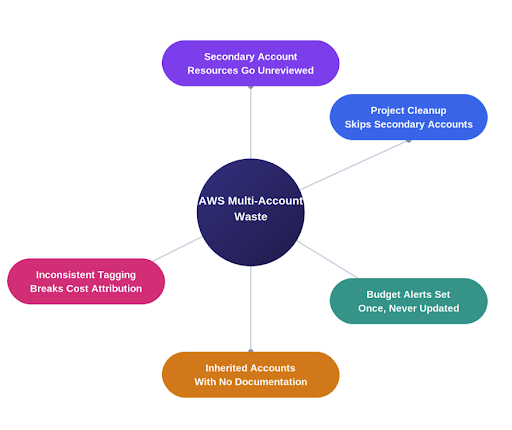
Resources in Secondary Accounts Never Get Reviewed
Developers with access to multiple accounts regularly spin up test resources in secondary accounts, finish the work, and never return. The person who created the resource is not looking at that account. The account owner does not know the resource exists. Neither account’s cost review surfaces it because the waste is in a different account from where the creator is looking.
Project Cleanup Happens in One Account and Skips the Rest
When a project spans multiple accounts, teams clean up in the account they interact with most. A project running across three accounts may leave behind stopped instances, unattached volumes, and idle load balancers in two of them because the team considered the project done after closing out the primary account.
Budget Alerts Set at Account Creation Are Never Updated
Budget alerts configured at account creation reflect spend levels at that moment. An account budgeted at $200 a month two years ago may now be running at $800 a month without a single alert firing because nobody updated the threshold. (Source: AWS Cloud Financial Management Blog) This is particularly common in accounts that started as proofs of concept and evolved into production workloads without a corresponding budget review.
Inherited Accounts With No Documentation
Accounts acquired through reorganisations, acquisitions, or handovers come with no record of what is running or why. The new owner cannot safely delete anything without understanding the context behind each resource, so nothing gets deleted. These accounts typically become the most expensive in the organisation precisely because they receive the least scrutiny.
Inconsistent Tagging Breaks Cross-Account Cost Attribution
When each account develops its own tagging conventions, consolidated reporting becomes unreliable. One team uses “prod,” another uses “production,” and another uses “Production.” AWS treats these as three separate values, fragmenting any AWS multi-account cost management report that relies on environment tags. The result is that nobody trusts the cross-account data enough to act on it, and the reports that should be driving cleanup decisions get ignored.
What a FinOps Team Does and Why Most Teams Cannot Justify One Yet
Harness’s FinOps in Focus report linked an estimated $44.5 billion in cloud infrastructure waste in 2025 to the disconnect between engineering teams provisioning resources without financial visibility and finance teams unable to attribute costs to specific owners. Understanding what FinOps practitioners actually do makes it clear why most teams cannot justify a dedicated hire at the point the problem first becomes visible.
The Five Core Tasks a FinOps Practitioner Runs Every Week
- Weekly cross-account cost review: Scanning every account for spend anomalies, tracing unusual charges to specific resources, and flagging anything that needs investigation before the month ends.
- Tag compliance auditing: Checking every account against the required tag policy, identifying missing or incorrect tags, and routing findings to the right owner for remediation.
- Idle and unattached resource reviews: Scheduled checks for stopped EC2 instances, orphaned EBS volumes, unused Elastic IPs, and idle load balancers across all accounts and regions.
- Budget threshold management: Reviewing and updating budget alerts as spend patterns change, ensuring thresholds reflect actual usage rather than historical baselines.
- Cross-account cost allocation reporting: Producing consolidated reports for finance and leadership that show spend by team, project, and environment rather than just by AWS service.
Why the Hire Cannot Be Justified at the Point the Problem Becomes Visible
The pain becomes visible when a team is running three to five accounts and the bill starts climbing without a clear explanation. At that point, the team is not large enough to justify a full-time hire, but the problem is real enough that ignoring it costs money every month. The work gets distributed informally, a DevOps engineer checks costs when they have time, a team lead runs a compliance check before a quarterly review, and a finance person exports billing data to a spreadsheet once a month. None of it happens on a consistent schedule, and none of it covers all accounts systematically.
How to Reduce AWS Waste Across Multiple Accounts Without a FinOps Hire
Set Up AWS Organizations With AWS Consolidated Billing
AWS Organizations with consolidated billing aggregates spend from every linked account into one management account, unlocks volume discounts, and gives you a usable starting point for cross-account analysis in Cost Explorer. Without this, every other cost reduction effort is per-account and misses the cross-account patterns that make multi-account waste so hard to see. This costs nothing and has no downside — it should be the first thing any multi-account team sets up if it is not already in place.
Enforce a Unified AWS Tagging Strategy Across All Accounts
AWS Organizations Tag Policies enforce consistent tag keys and allowed values across every account in the organization, regardless of which team owns that account or what their local conventions were before. Define Owner, Project, Environment, and Cost Centre as mandatory tags at the organisational level, enforce allowed values to prevent fragmentation, and apply the policy to every account, including new ones as they are created.
Manage AWS Budget Alerts Centrally, Not Per Account
Managing budgets through the management account using AWS Budgets lets you set and update thresholds for every linked account from one place and route alerts to the right owner. The specific threshold amounts matter less than two things: they reflect current usage rather than historical baselines, and they route to the person who can actually investigate and act.
Run Scheduled AWS Idle Resources Reviews Across All Accounts and Regions
A quarterly review covering every account across every region is the minimum cadence needed to prevent idle resources from accumulating into a high monthly cost. Each review only needs to answer one question per resource: Is there a documented reason this still exists? If the answer is no, it is a candidate for termination. If nobody can answer the question, it is an untagged resource with no owner. For a governance problem covered in detail, read: https://www.ksolves.com/blog/devops/hidden-aws-costs-draining-your-budget
Automate Cross-Account Scanning and Reporting
Manual reviews on a quarterly schedule find waste after it has already been running for months. Automating scanning, compliance checking, and reporting removes the dependency on individual memory and availability.
How Ksolves Cloud Agent Reduces AWS Waste Across Multiple Accounts
All the practices above work on one fundamental condition: somebody has to remember to run them, have access to do it, and have the time to act on what they find. In most engineering teams managing multiple AWS accounts, that combination rarely comes together on a consistent schedule.
Ksolves Cloud Agent is a custom-built AWS cost management and governance system built by Ksolves, a DevOps consulting services partner with 14 years of experience working across AWS environments. It runs every weekday morning, scans every account and region you configure, and delivers a consolidated report to each account owner before the workday starts.
What it covers across your AWS accounts:
- Stopped EC2 instances running for 30 or more days with storage still being billed
- Unattached EBS volumes with no instance to serve
- Unused Elastic IPs are reserved but point to nothing
- Idle load balancers with near-zero traffic are still charging a fixed hourly rate
- GP2 storage volumes eligible for GP3 migration at a 20% lower cost
- Empty S3 buckets accumulated without purpose
- Tag violations across EC2, RDS, S3, and EBS against your required tag policy
- Daily spend anomalies, budget threshold breaches at 80% and 100%, and forecast overruns
- Security Group inbound rules are open to the internet on sensitive ports
- IAM over-permission analysis and credential hygiene checks
- WAF coverage mapping across internet-facing resources
- Encryption-at-rest status across S3, EBS, RDS, and DynamoDB
- Public exposure checks across S3 buckets, RDS instances, and snapshots
Each finding includes the resource ID, region, account, and estimated monthly cost or risk level. Every finding goes directly to the account owner responsible for it. The right person gets the right information before their day starts, across every account you configure, without opening a dashboard or running a compliance report manually.
Ksolves configures and deploys the system inside your AWS environment, sets it up for your specific accounts, tag requirements, budget thresholds, and scan schedule, and hands it over. You own it after the engagement closes with no recurring platform fees. New capabilities are pushed directly to existing deployments as they are released.
To learn more about how Ksolves Cloud Agent works and what a deployment looks like, visit https://www.ksolves.com/cloud-agent
Conclusion
The visibility and accountability gaps in multi-account AWS environments are predictable. Resources created in secondary accounts that nobody reviews, project cleanup that skips all but the primary account, budget thresholds that were set once and never revisited: these patterns repeat because AWS billing is account-scoped by default and governance requires deliberate effort that most teams cannot sustain without automation.
Consolidated billing, unified tag policy enforcement, centrally managed budget alerts, and scheduled idle resource reviews address the structural side. Automating the scanning and reporting removes the dependency on a person to run them consistently. Together, these cover the AWS FinOps work that most teams distribute informally across people who already have jobs, and that never gets done consistently enough to actually reduce waste.
The first blog in this series covers the specific resource types that generate hidden costs in AWS accounts and what each one costs per month.
If your team is managing multiple AWS accounts without automated governance across all of them, the waste covered in this piece is almost certainly accumulating right now.
Talk to our team about deploying Ksolves Cloud Agent for your environment.
































AUTHOR
DevOps
Share with