



How to Optimise Odoo Attachment Storage with Amazon S3 Integration
Odoo
5 MIN READ
July 27, 2026

As businesses grow, so does the volume of documents they generate. Customer contracts, supplier agreements, invoices, product images, HR records, compliance documents, and countless other files become an integral part of daily operations. For organisations running Odoo as their ERP platform, these attachments are stored alongside business processes, making them easily accessible but also creating a growing challenge as storage requirements increase.
While Odoo’s native attachment management works exceptionally well for many organisations, businesses dealing with tens or hundreds of gigabytes of files eventually begin experiencing storage constraints, larger backups, longer maintenance windows, and increasing infrastructure costs.
This was exactly the situation one of our clients faced. Their Odoo environment had accumulated over 70GB of attachments, and the existing storage approach was no longer sustainable.
Rather than simply adding more server storage, we redesigned the attachment architecture by integrating Amazon S3 with Odoo. The result was a scalable, secure, cloud-native document storage solution that significantly reduced server storage while preserving the seamless user experience employees were already familiar with.
In this article, we’ll walk through the business challenge, our solution architecture, implementation strategy, migration approach, and the measurable business benefits achieved after moving attachment storage to Amazon S3.
Understanding Odoo’s Default Attachment Storage
Before discussing the solution, it’s important to understand how Odoo manages attachments.
Whenever users upload documents into Odoo, whether from Sales, Purchase, Accounting, CRM, Inventory, Manufacturing, or HR, the files are typically stored in Odoo’s filestore. The database maintains metadata about each attachment while the actual binary files reside on the application server.
This architecture is simple and highly effective for many businesses. However, as organisations scale, thousands, or even millions, of files begin accumulating over time.
Eventually, organisations encounter challenges such as:
- Rapid growth in server storage.
- Larger backup files.
- Longer backup and restoration times.
- Increased infrastructure costs.
- Higher maintenance overhead.
- Difficult scalability planning.
These issues become particularly evident when large documents, images, scanned invoices, engineering drawings, or compliance records are uploaded daily.
Also Read: Integrating Third-Party Apps with Odoo: Dos, Don’ts & Best Practices
The Business Challenge
Our client relied on Odoo as the central platform for managing their business operations. Employees across multiple departments uploaded documents throughout the day, making attachments an essential part of everyday workflows.
Over several years, the volume of stored files increased significantly.
The system contained more than 70GB of business-critical attachments, including:
- Customer documentation
- Vendor contracts
- Purchase documents
- Sales quotations
- Product images
- HR records
- Accounting documents
- Miscellaneous operational files
Although the ERP itself continued functioning correctly, attachment storage had become a growing operational concern.
1. Growing Storage Requirements
Every uploaded document occupied valuable storage on the application server.
As the business expanded, so did attachment growth, requiring increasingly larger storage volumes and more frequent infrastructure upgrades.
2. Expanding Backup Size
Since attachments formed part of the server’s storage, backup operations became considerably larger.
This resulted in:
- Longer backup windows.
- Increased backup storage costs.
- Slower disaster recovery.
- Higher operational complexity.
For organisations with strict recovery objectives, this quickly became a significant concern.
3. Performance and Maintenance Challenges
Although Odoo itself remained responsive, managing an ever-growing filestore complicated routine maintenance activities.
System administrators faced longer maintenance cycles, increased storage management, and more complex server planning.
4. Rising Infrastructure Costs
Scaling local storage meant investing in larger cloud disks, higher-capacity virtual machines, and expanded backup infrastructure.
This approach was neither cost-effective nor sustainable for long-term growth.
Is Your Odoo Storage Growing Faster Than Your Business?
What the Client Needed
The objective wasn’t simply to increase storage capacity. The client wanted a future-ready solution capable of supporting business growth without repeatedly expanding application server resources.
The ideal solution needed to:
- Support virtually unlimited attachment growth.
- Reduce dependency on local server storage.
- Preserve existing Odoo workflows.
- Maintain secure document access.
- Simplify backup and disaster recovery.
- Migrate existing attachments without downtime or data loss.
These requirements naturally pointed towards cloud object storage.
Why Amazon S3?
Amazon Simple Storage Service (Amazon S3) has become one of the world’s most trusted cloud storage platforms for enterprise applications.
Unlike traditional server storage, S3 is designed specifically for storing massive amounts of unstructured data while providing exceptional durability, availability, and scalability.
Some of its key advantages include:
- Virtually unlimited storage capacity.
- High durability for stored objects.
- Pay-as-you-use pricing.
- Built-in redundancy.
- Secure access controls.
- Encryption support.
- High availability.
- Native integration with cloud applications.
Instead of continuously expanding application servers, businesses can leverage Amazon S3 as a dedicated storage layer while allowing Odoo to focus solely on ERP operations.
Our Solution Architecture
We implemented a custom Amazon S3 integration that completely transformed how Odoo handled binary attachments.
Instead of storing uploaded files within the local filestore, Odoo now uploads them directly to Amazon S3.
The ERP retains only lightweight metadata required to locate and retrieve the document whenever users access it.
Rather than storing the binary file itself, Odoo now stores:
- Object key
- Bucket information
- File name
- MIME type
- File size
- S3 object reference
The actual document resides securely inside Amazon S3.

Looking to Extend Odoo Beyond Standard Capabilities?
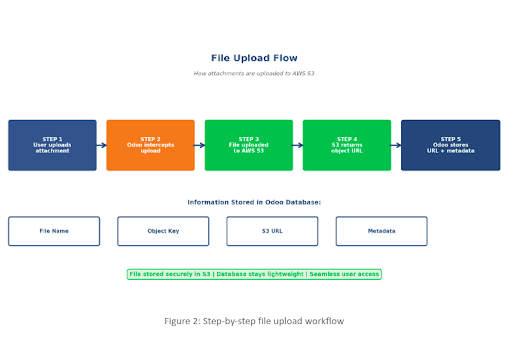
How the Upload Process Works
One of the primary design goals was complete transparency for end users.
Employees shouldn’t need to learn new processes or interact directly with Amazon S3.
Whenever a user uploads a document:
- The user uploads the attachment through Odoo.
- Our custom module intercepts the upload request.
- The file is securely transferred to Amazon S3.
- Amazon S3 generates the object location.
- Odoo stores only the corresponding metadata.
- The attachment immediately becomes available within Odoo.
From the user’s perspective, nothing changes. Documents appear exactly where users expect them. The cloud storage layer remains completely invisible.
Seamless File Retrieval
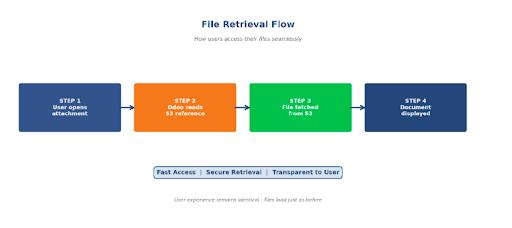
Downloading or viewing attachments follows an equally transparent process.
When users open a document:
- Odoo retrieves the stored object reference.
- The application securely requests the file from Amazon S3.
- The document is streamed back to the user.
- The file opens exactly as before.
Employees continue working without knowing whether the document resides locally or in cloud storage.
Migrating 70GB of Historical Attachments
Migrating existing documents was arguably the most critical phase of the project.
The client had accumulated over 70GB of historical business documents, all of which needed to remain accessible after migration.
Manual migration was neither practical nor reliable.
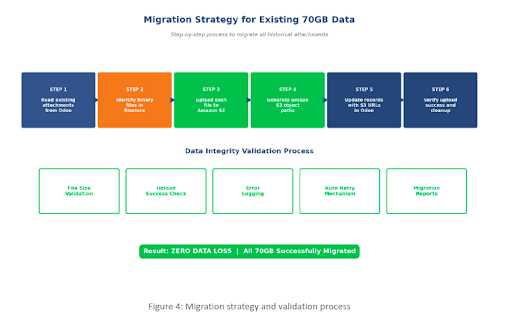
Instead, we developed an automated migration utility capable of processing every attachment safely and efficiently.
The migration workflow included:
- Reading attachment records from Odoo.
- Identifying corresponding binary files.
- Uploading files to Amazon S3.
- Generating structured object paths.
- Updating attachment metadata.
- Verifying upload success.
- Recording migration status.
- Logging exceptions.
- Retrying failed uploads automatically.
This automated approach eliminated manual effort while significantly reducing migration risk.
Ensuring Zero Data Loss
To guarantee complete data integrity, we introduced multiple verification checkpoints throughout the migration process.
Each uploaded file underwent validation before the original reference was considered migrated.
Validation included:
- File size verification.
- Upload confirmation.
- Object accessibility checks.
- Error logging.
- Retry mechanisms.
- Migration reporting.
This layered validation strategy ensured that every attachment remained secure and accessible throughout the migration process.
Security by Design
Moving business documents to the cloud requires strong security controls.
1. Amazon S3 Security
The storage layer was protected using multiple AWS security features, including:
- Private S3 buckets.
- IAM role-based access.
- Bucket policies.
- Server-side encryption.
- Secure HTTPS communication.
- Controlled object permissions.
These controls ensured that files remained inaccessible outside authorised application workflows.
2. Odoo Security
Existing Odoo permissions remained completely unchanged.
User access continued to be governed by Odoo’s own authentication and authorisation mechanisms.
This meant:
- Existing user permissions remained intact.
- Access rights continued to follow business roles.
- Users could only access authorised documents.
- No additional authentication steps were introduced.
The migration improved storage architecture without affecting business security policies.

Technical Implementation
The integration was developed as a custom Odoo module using proven AWS technologies.
Technology Stack
- Odoo Custom Module
- Python
- Amazon S3
- AWS IAM
- Boto3 SDK
- PostgreSQL
The module was designed to remain configurable, maintainable, and easy to extend for future requirements.
Key Features Delivered
- Automatic Cloud Upload
Every newly uploaded attachment is automatically transferred to Amazon S3 without requiring any manual intervention.
- Legacy Attachment Migration
Historical files can be migrated in bulk using the migration utility while preserving attachment relationships and metadata.
- Intelligent Error Handling
Network interruptions and temporary AWS service issues are handled through exception management and automated retries.
- Comprehensive Logging
Every upload, migration activity, validation result, and exception is recorded, providing complete operational visibility and simplifying troubleshooting.
- Configurable Storage Management
Bucket names, credentials, and connection settings can be managed through Odoo configuration, eliminating the need for code changes during administration.
Best Practices We Followed
A successful cloud storage integration involves more than simply uploading files.
Some of the best practices implemented during this project included:
- Using structured object naming conventions for easier management.
- Keeping S3 buckets private by default.
- Encrypting all stored objects.
- Following least-privilege IAM policies.
- Implementing retry logic for upload failures.
- Maintaining detailed audit logs.
- Validating every migrated file before completion.
- Designing configuration-driven storage management.
These practices improve maintainability, strengthen security, and simplify future scaling.
Business Benefits Achieved
Following implementation, the client experienced measurable improvements across infrastructure, operations, and long-term scalability.
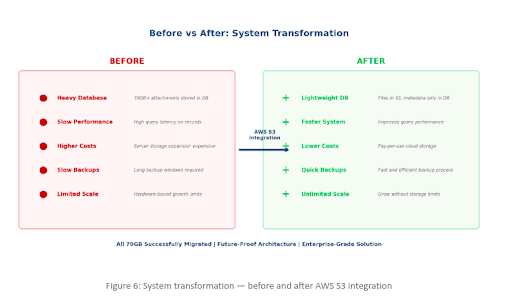
- Significant Reduction in Server Storage
Removing binary files from the application server substantially reduced local storage requirements, freeing resources for core ERP operations.
- Improved Scalability
Amazon S3 can store virtually unlimited objects, enabling the organisation to continue growing without repeatedly expanding application infrastructure.
- Faster Backup and Recovery
Because attachments no longer occupied local storage, backup operations became considerably faster and more efficient.
This also reduced disaster recovery complexity.
- Lower Infrastructure Costs
Rather than continuously purchasing larger storage volumes, the organisation now benefits from Amazon S3’s scalable, pay-as-you-go pricing model.
- Higher Reliability
Amazon S3 offers enterprise-grade durability and availability, ensuring business-critical documents remain protected over the long term.
- Simplified Infrastructure Management
The IT team now spends significantly less time managing storage expansion, allowing greater focus on strategic initiatives instead of operational maintenance.
When Should You Consider Amazon S3 Integration for Odoo?
This architecture isn’t limited to organisations with massive datasets.
If your Odoo environment is showing any of the following signs, cloud-based attachment storage may be worth considering:
- Large volumes of uploaded documents.
- Rapidly growing filestore size.
- Slow backup and restoration processes.
- Increasing storage infrastructure costs.
- Multi-location deployments requiring scalable storage.
- Long-term document retention requirements.
- Cloud-first infrastructure strategy.
Implementing object storage early can prevent future scalability challenges while reducing operational overhead.
Why Choose Ksolves for Odoo Cloud Integrations?
At Ksolves, an AI-first Odoo development company, we specialise in designing scalable, enterprise-grade Odoo solutions that go beyond standard implementations. As an Odoo Gold Partner, we help organisations modernise their ERP environments with cloud-native architectures, custom integrations, and performance-focused enhancements tailored to evolving business needs.
Whether it’s integrating Amazon S3 for attachment storage, connecting third-party business applications, optimising system performance, or developing custom Odoo modules, our team combines deep Odoo expertise with cloud engineering best practices to deliver secure, scalable, and future-ready solutions.
Conclusion
As businesses continue to generate larger volumes of documents, relying solely on local storage can limit the scalability and efficiency of an Odoo deployment.
In this implementation, migrating over 70GB of historical attachments to Amazon S3 enabled the client to significantly reduce server storage, streamline backups, and build a future-ready document management architecture, all without disrupting the user experience.
Transform Your Odoo into a Scalable, Cloud-Ready ERP with Ksolves!
































AUTHOR
Odoo
Share with