



Is Your Odoo Instance Ready for AI Document Processing? A Practical Checklist
Odoo
5 MIN READ
October 16, 2026

AI document processing can change how businesses handle invoices, purchase orders, sales orders, and other documents in Odoo. Instead of manually reading documents and entering the same information into ERP records, AI can extract relevant data and help automate the workflow.
But installing an AI-powered module is only one part of the equation. For document automation to work reliably, your Odoo instance also needs clean master data, defined workflows, consistent document types, appropriate review processes, and a way to handle exceptions.
What Does “AI-Ready” Actually Mean for Odoo?
Being AI-ready does not simply mean having an Odoo database and an AI tool. For document processing, an AI-ready Odoo environment should be able to take information from an incoming document and move it through a controlled workflow:
Document → AI Extraction → Validation → Human Review → Odoo Record
For example, a vendor invoice can enter the system, have its relevant information extracted, be checked for confidence and accuracy, and then become an Odoo vendor bill.
Similarly:
- Customer PO → Sales Order
- Supplier document → Purchase Order
- Business card or enquiry → CRM Lead
The more structured this workflow is, the easier it becomes to automate document-heavy processes without losing control.
The Odoo AI Document Processing Readiness Checklist
1. Are Your Documents Available in Digital Formats?
AI document processing starts with the document itself.
Businesses may receive invoices and purchase orders through email attachments, PDFs, scanned files, images, or documents uploaded directly by employees. Before automation, these documents need to be accessible to the system and readable enough for information extraction.
Check your Odoo setup:
- Business documents are available digitally.
- PDFs and images are generally readable.
- Important fields are not consistently obscured or cut off.
- Documents can be uploaded or routed into Odoo.
- Teams are not dependent on paper documents for routine transactions.
If documents already arrive digitally, you have a strong starting point for AI-powered processing.
2. Do You Have Repetitive Document Workflows?
AI becomes particularly useful when employees repeatedly perform the same document-to-data-entry task.
Consider a finance employee who receives dozens of vendor invoices every day. The information may differ, but the basic workflow remains the same:
Open invoice → Read invoice → Find vendor → Enter details → Add products → Check totals → Create vendor bill
The same pattern can occur in sales and procurement.
Look for workflows such as:
- Vendor invoice → Vendor Bill
- Customer PO → Sales Order
- Supplier order document → Purchase Order
- Business card or enquiry → CRM Lead
Ask yourself:
- Do employees repeatedly enter information from documents?
- Do the same types of documents arrive regularly?
- Does manual entry consume significant employee time?
- Do transcription errors create downstream issues?
- Would faster document processing improve operational visibility?
If several answers are yes, the workflow may be a good candidate for AI automation.
Still Copying Data from Invoices and POs into Odoo Manually?
3. Is Your Odoo Master Data Clean Enough?
AI can extract information from a document, but extraction alone does not guarantee correct Odoo records.
Consider a vendor invoice containing a supplier name or product description. Odoo may need to match that information with an existing partner or product. That makes your master data important.
Before introducing AI document processing, review:
- Customers
- Vendors
- Products
- Product references
- Taxes
- Units of Measure
- Pricelists
- Accounting configurations
Readiness checklist:
- Duplicate partner records have been addressed.
- Product names and references are reasonably consistent.
- Vendor and customer information is maintained.
- Tax configurations are correct.
- Required Odoo master records are available.
AI can automate data extraction, but it cannot compensate for every underlying master-data problem. A clean Odoo foundation makes automated document processing easier to control and maintain.
Also Read: 7 Best Odoo Apps by Ksolves to take your Business to the Next Level
4. Are Your Document Types Clearly Defined?
Before automating document processing, decide what each document should become inside Odoo.
For example:
| Incoming Document | Odoo Destination |
|---|---|
| Vendor Invoice | Vendor Bill |
| Customer Purchase Order | Sales Order |
| Supplier Order Document | Purchase Order |
| Business Card / Enquiry | CRM Lead |
This definition becomes particularly important when different document types enter the same processing pipeline.
A system should not blindly process every file as an invoice simply because it contains numbers, dates, and company information.
Check whether:
- Each document type has a defined destination.
- Users understand which workflow applies to each document.
- Incorrect document types can be identified before record creation.
- Document-processing rules are clearly established.
5. Do You Have Clear Record-Creation Rules?
Extracting information is only half the job. The extracted information must eventually become a useful Odoo record.
For example, extracting a customer PO may involve identifying:
- Customer
- Order reference
- Order date
- Delivery date
- Products
- Quantities
- Prices
- Taxes
- Total amount
Your Odoo configuration needs to support how these values should be handled.
Check your workflow:
- Required Odoo fields are clearly understood.
- Partner matching rules are defined.
- Product matching requirements are known.
- Tax handling is configured correctly.
- Exceptions have a defined process.
- Users know what to do when extracted information cannot be matched.
The objective is not merely to extract text from a document. The objective is to turn useful information into an actionable Odoo transaction.
Also Read: Training and Development: Empower Your Team with Odoo Skills
6. Do You Have a Human Review Process?
AI automation should not mean that every extracted value is accepted without review. Some documents may contain:
- Unclear scans.
- Unusual layouts.
- Missing information.
- Ambiguous values.
- Low-confidence fields.
- Information that does not match existing Odoo records.
A reliable AI document workflow therefore needs an exception-handling process.
Your readiness checklist:
- Users can identify records requiring review.
- There is a defined owner for exceptions.
- Low-confidence information does not silently become trusted data.
- Users can review and correct extracted information.
- Business-critical documents have appropriate controls.
7. Can You Track the Document’s Processing Status?
Once document volumes increase, simply knowing that a file was uploaded is not enough. Teams need to know what happened after the document entered the system.
A structured processing workflow can distinguish between documents that are waiting, successfully extracted, converted into Odoo records, or have encountered an error.
For example:
Draft → Extracted → Record Created → Error
Check whether:
- Pending documents are visible.
- Failed processing can be identified.
- Successfully processed documents can be tracked.
- Users can distinguish extraction from record creation.
- Errors can be investigated instead of disappearing into the workflow.
Know Where Every Document Stands, From Extraction to Record Creation!
8. Can Documents Enter Odoo Automatically?
One of the biggest benefits of document automation is removing unnecessary manual steps before extraction even begins.
Compare two workflows.
Traditional workflow
Email → Download attachment → Open document → Read information → Enter into Odoo → Attach document
Automated workflow
Email → Document Processing → AI Extraction → Validation → Odoo Record
The second workflow removes several repetitive steps. An AI-ready environment should therefore consider how documents enter the system.
Check whether:
- Documents can be routed into Odoo automatically.
- Email aliases can be used for relevant workflows.
- Bulk document uploads would be useful.
- Documents App folders can act as an intake point.
- Scheduled processing could reduce manual intervention.
9. Do You Have Duplicate-Document Controls?
Automating document creation without duplicate controls can create another problem: duplicate records.
For example, the same vendor invoice might be:
- Emailed to the company.
- Downloaded by an employee.
- Uploaded manually.
- Processed again through an automated workflow.
Without a duplicate check, the same source document could enter the processing pipeline more than once.
Check whether:
- Duplicate documents can be identified.
- Duplicate processing generates a clear warning.
- Users can investigate potential duplicates.
- Automated workflows don’t silently create duplicate transactions.
Also Read: Why Should SMEs Switch to Odoo ERP in 2025?
10. Can You See What the AI Extracted?
Automation becomes more useful when teams can understand what happened to a document, not just see the final Odoo record.
For business-critical documents, you may want visibility into:
- The original document.
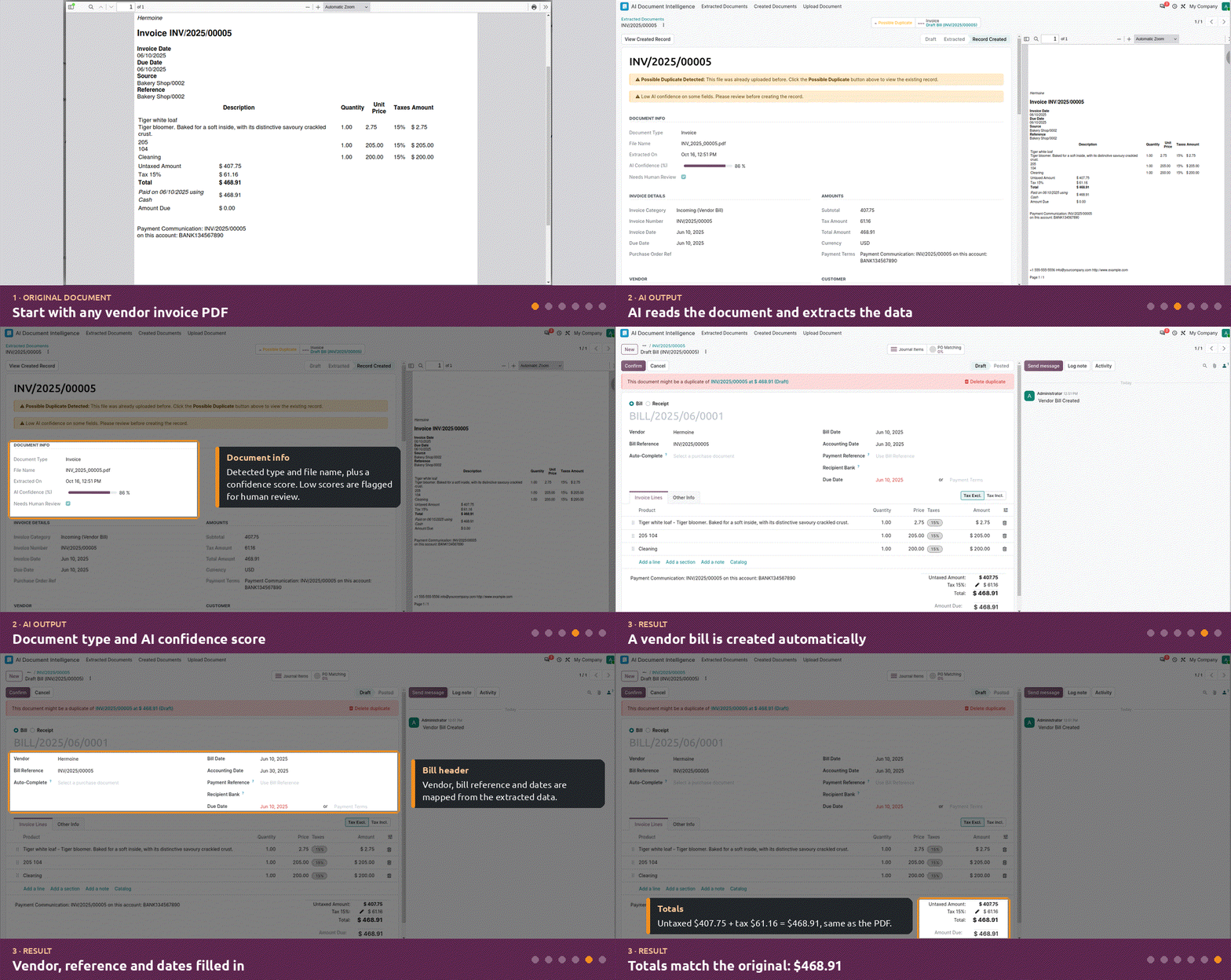
- Extracted information.
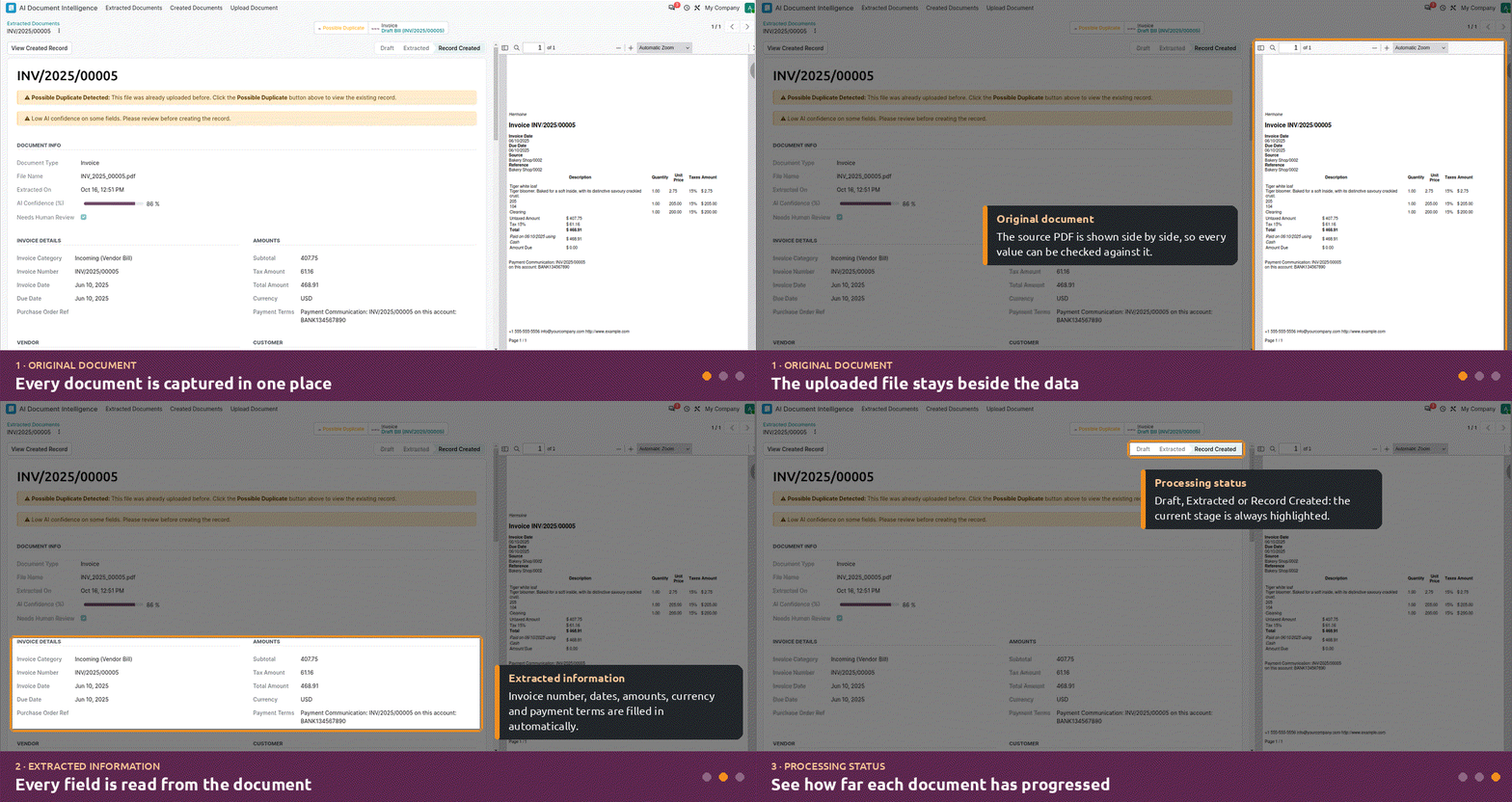
- Processing status.
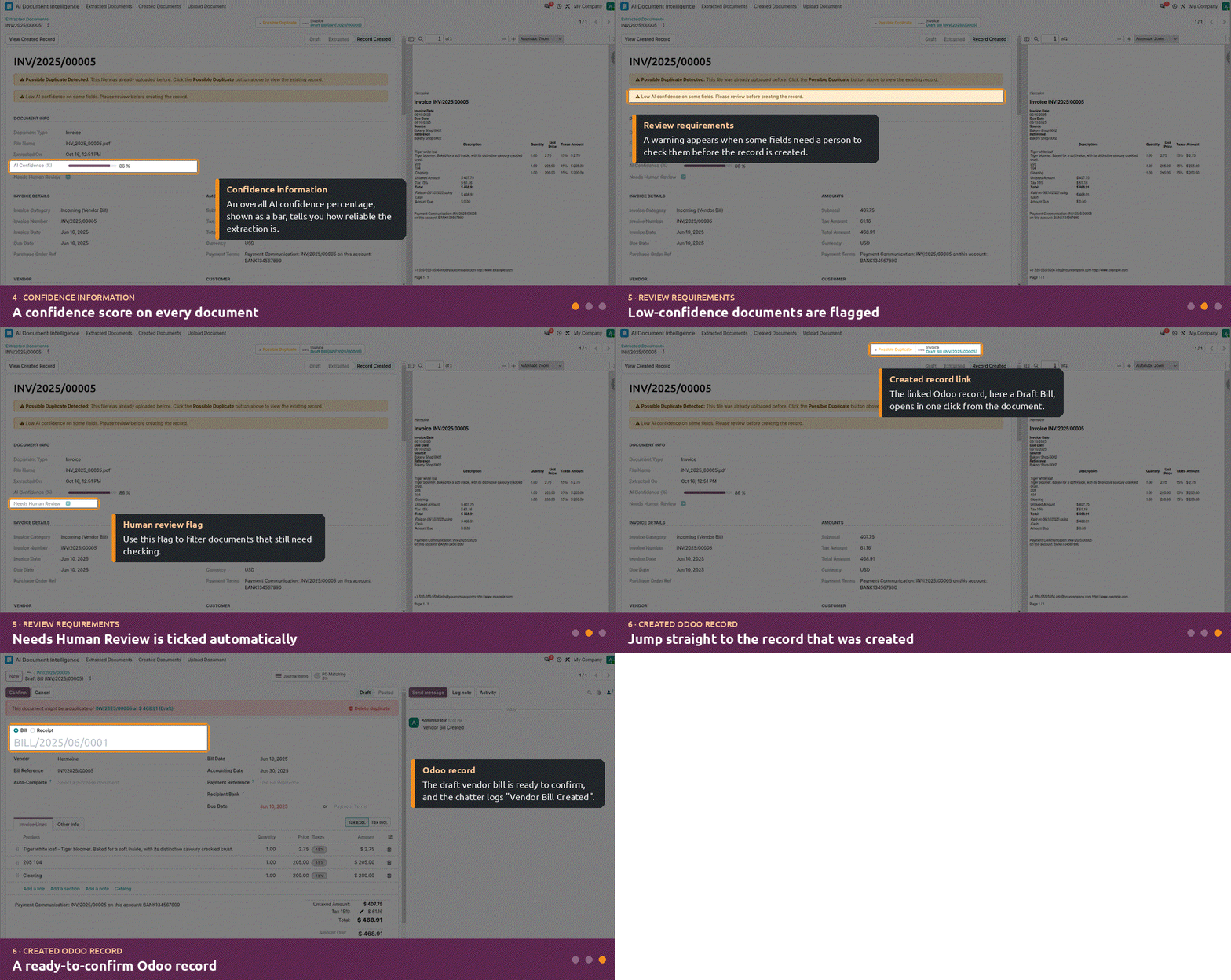
- Confidence information.
- Review requirements.
- Created Odoo record.
- Processing errors.
- Multi and Single Upload
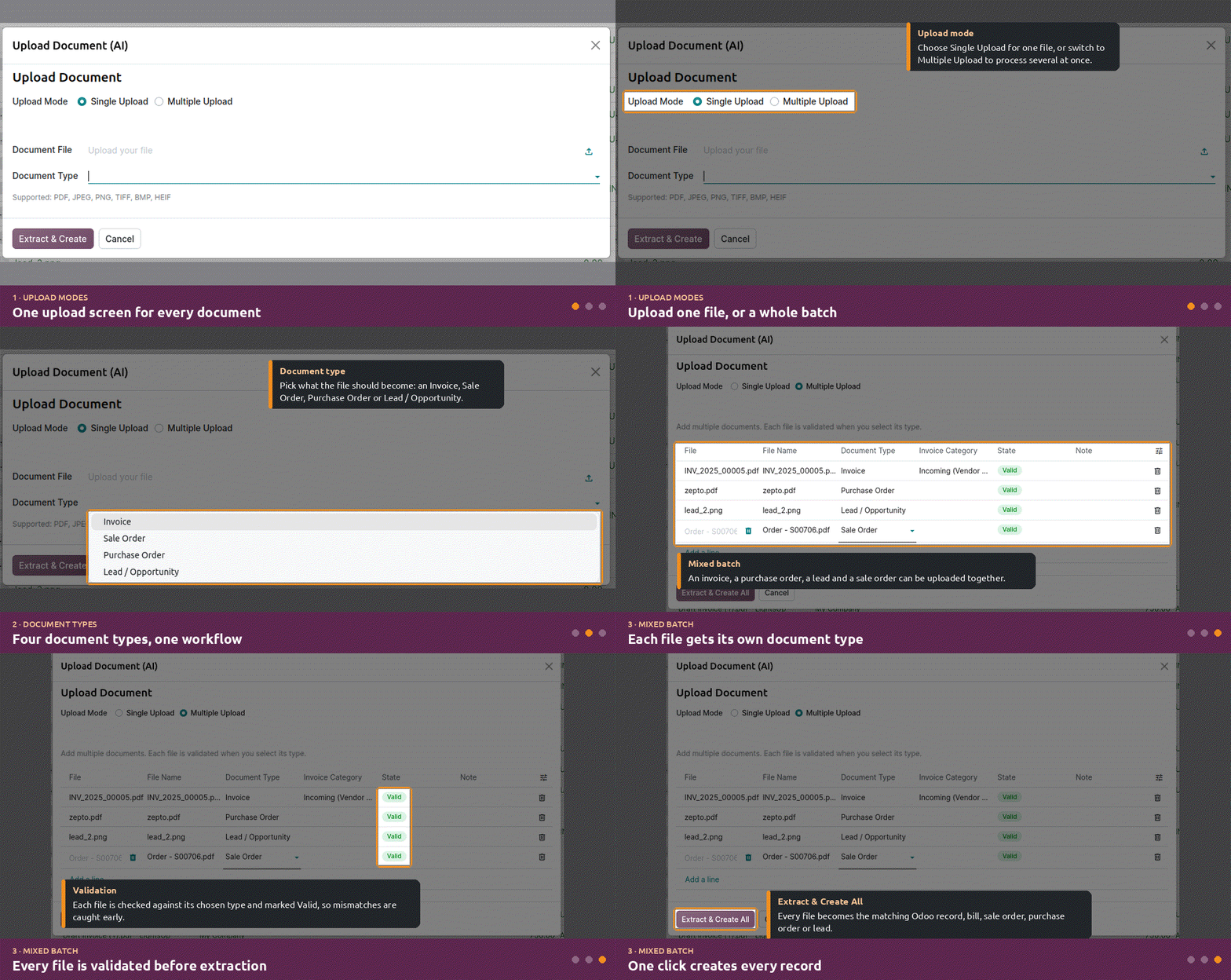
Check your environment:
- Source documents are retained.
- Processing status is visible.
- Extracted information can be reviewed.
- Uncertain data can be identified.
- The source document can be traced to the resulting Odoo record.
- Processing information can be used for troubleshooting.
How Odoo Document Intelligence Fits Into the Checklist
Once the underlying requirements are in place, Odoo Document Intelligence brings the document-processing workflow directly into Odoo.
| AI Readiness Requirement | KS Odoo Document Intelligence |
|---|---|
| Multiple document workflows | Invoice, Sales Order, Purchase Order, CRM Lead |
| Automated document intake | Email, upload, bulk upload, Documents App |
| Document validation | AI-powered document-type validation |
| Data extraction | AI-powered structured extraction |
| Uncertain information | Confidence-based human review |
| Duplicate control | MD5 document fingerprinting |
| Automated processing | Scheduled/cron-based processing |
| Odoo automation | Native Odoo record creation |
| Document organization | Documents App filing |
| Processing visibility | Structured extraction states |
| Traceability | Source document and extraction information |
The key is that the module connects these capabilities into one workflow.
For example, a vendor invoice can enter through email, pass through duplicate and document-type checks, have its information extracted, trigger human review when required, and ultimately become an Odoo vendor bill.
The same principle can be applied to sales orders, purchase orders, and CRM lead capture.
Final Words
AI document processing works best when it is treated as a business workflow transformation, not simply an OCR upgrade. Your Odoo instance needs the right documents, data, rules, controls, and review process to turn AI extraction into reliable business automation.
With Odoo Document Intelligence, that workflow can happen within Odoo, from document intake and AI extraction to validation, human review, record creation, and document filing.
Ready to see your documents become Odoo records automatically?

































AUTHOR
Odoo
Neha Negi, Presales and Business Associate Head at Ksolves is a results-driven ERP consultant with over 8 years of expertise in designing and implementing tailored ERP solutions. She has a proven track record of leading successful projects from concept to completion, driving organizational efficiency and success.
Share with