



ERP for Logistics: How ERPNext Handles Shipping, Fleet, and Warehouse Operations in One System
ERPNext
5 MIN READ
July 31, 2026

Shipping is the core of any logistics business. But keeping it accurate and on time becomes harder as operations grow.
The most simplified journey of a shipment will still include an order confirmation, a stock check, a packing step, a delivery run, and an invoice. Each of these steps is usually owned by a different tool or a different spreadsheet, which means a delay or an error in one step is not visible to the next until it becomes a problem.
Many logistics companies start with basic tools for shipping or inventory, but those tools do not stay connected to the rest of the operation. Shipping runs in one system, stock in another, billing somewhere else. This disconnect slows down decisions and creates errors that show up later, at invoicing or during a stock count.
What ERPNext Covers for a Logistics and Distribution Operation
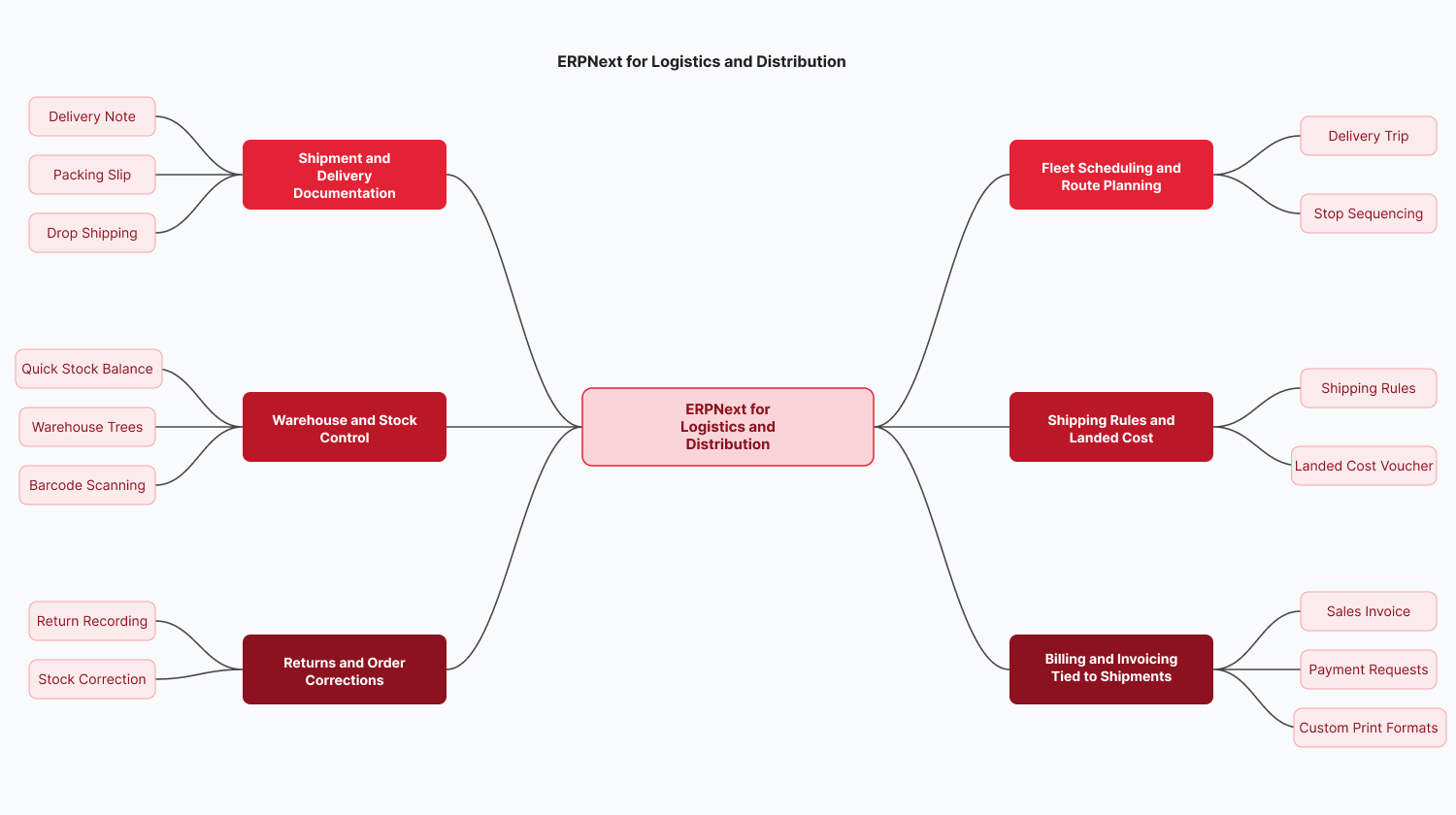
ERPNext does not treat logistics as an afterthought bolted onto a generic inventory module. It covers the operational chain end to end, from the moment an order is confirmed to the moment it is invoiced.
Shipment and Delivery Documentation
Every shipment needs a paper trail that a transporter can carry, and a record the business can check later if something goes wrong. In ERPNext, this is handled through a document called a Delivery Note. It gets generated for the shipment, can be printed and handed to the transporter, and carries transporter details, partial delivery records, and delivery confirmation, all logged against that one document.
When an order goes out in multiple boxes, ERPNext uses a second document called a Packing Slip. Each box gets its own Packing Slip, but every one of them stays linked back to the same Delivery Note. So a five-box shipment and a fifty-box shipment are tracked the same way, instead of the common alternative of a manual packing list that has to be manually reconciled against the delivery note afterward.
Drop shipping works through the same order record. When a supplier ships directly to the customer on the business’s behalf, that detail is recorded on the original order itself, so both the business’s stock records and the supplier’s fulfillment stay tied to one transaction, instead of living in two separate systems that someone has to match up by hand.
Fleet Scheduling and Route Planning
Getting a driver from stop to stop in a sensible order, and knowing roughly when each delivery will happen, is something most small fleets manage with a printed list or a text message. In ERPNext, this is handled through a record called a Delivery Trip. It logs each run a driver makes, with every stop carrying its own address, and an estimated arrival time calculated from that address.
Stops can also be sequenced within the trip, so the route is planned in advance rather than followed in whatever order the orders happened to come in. This matters because a badly sequenced trip means a driver backtracking across the same area multiple times in one day.
Because the Delivery Trip lives in the same system as the rest of the operation, a dispatcher and a driver are both looking at the same record, not a version that only exists on the driver’s phone and never makes it back to anyone else.
Warehouse and Stock Control
Knowing exactly how much stock is sitting in a warehouse, right now, for a specific item, is something most logistics businesses struggle with day to day. In ERPNext, this is answered by a report called Quick Stock Balance. It pulls the current count for a specific item in a specific warehouse, as of a specific date, the moment someone runs it. Many businesses instead rely on a warehouse manager checking a spreadsheet updated the previous evening, so the number in front of them is already wrong by the time a decision gets made.
For businesses running more than one warehouse, ERPNext also groups all locations under a structure called Warehouse Trees, with a separate account for each one. This means stock movement, expenses, and profit and loss can be checked per location directly, instead of being built by manually combining reports from each warehouse.
Recording transactions by typing item codes manually is also where a lot of stock errors start. ERPNext supports barcode scanning for this, connected to a desktop or used through a phone on the warehouse floor, so an item is logged by scanning it rather than typing it in.
Shipping Rules and Landed Cost
Working out what to charge for shipping, when rates depend on where an order is going and how heavy it is, is usually done by hand or through a rough rule of thumb. ERPNext has a feature called Shipping Rules for this. A rule can be set up to calculate a charge automatically based on territory or distance, and applied against either the order’s total value or its total weight, so the same logic runs consistently for every order instead of depending on whoever happens to be processing it that day.
Some costs, like freight or customs duties, only become known after an invoice has already gone out. ERPNext handles this through a Landed Cost Voucher, which lets those charges be added to the true cost of the goods afterward. The common alternative is adjusting the books separately once the extra cost comes in, which means the recorded cost of goods stays inaccurate until someone remembers to fix it.
Returns and Order Corrections
Returns, whether from a customer or back to a supplier, need to update stock the moment they happen, not days later. In ERPNext, a return is recorded in two clicks against the original transaction, and stock is corrected automatically as soon as it is logged. The usual alternative is a separate returns log, kept apart from the main inventory count and reconciled against it at month end, by which point the stock number has already been wrong for weeks.
Billing and Invoicing Tied to Shipments
An invoice should reflect what actually left the warehouse, not what the order originally said. In ERPNext, the Sales Invoice is generated against the shipped quantity, so it does not need to be corrected later if the shipped amount turned out different from the order. Payment requests and reminders, sent by email or SMS, are built into the same invoice record.
For businesses that need branded or region-specific paperwork, print formats can be customized using HTML or Jinja templates. Multiple units of measure and multiple currencies are supported natively as well, so a shipment invoiced in kilograms to one customer and in pieces to another does not require two separate processes to manage it.
Suggested Read: ERPNext POS vs Traditional POS Systems: What Changes When Your POS Is Part of Your ERP
ERPNext Real-World Use Cases: Industry-Specific Logistics Solutions
Logistics is not one operation. A freight forwarder, a 3PL warehouse, and a trucking fleet have different pressure points, even though all three sit under the same broad label.
Freight Forwarding and Multi-Party Shipments
A freight forwarding deal typically involves a supplier, a carrier, a customs agent, and the client, each contributing a separate cost line before a quotation can be issued. Landed cost vouchers pull freight, customs duties, and carrier charges into one figure against the shipment, so the quotation reflects the true cost rather than an estimate assembled from four separate invoices after the fact.
Third-Party Logistics (3PL) and Warehousing
A 3PL operation is managing inventory on behalf of multiple clients inside the same physical space, which means stock has to stay segregated by client even when it sits on adjacent shelves. Warehouse trees and per-warehouse accounting keep that separation clean, so a client-wise stock report does not require manually filtering a combined spreadsheet.
E-commerce Fulfillment and Last-Mile Delivery
High order volume with tight delivery windows is the defining pressure here. Packing slips handle multi-box orders at scale, drop shipping supports fulfillment models where stock never physically touches the seller’s warehouse, and delivery trip route optimization keeps last-mile costs down as order volume climbs.
Trucking and Fleet-Based Distribution
Fleet-based operations live or die on driver scheduling and delivery accuracy. Delivery trip records handle driver assignment, address-based ETA calculation, and route sequencing at a scale that spreadsheets and paper manifests cannot keep up with once a fleet grows past a handful of trucks.
Import/Export and Cross-Border Trade
Cross-border shipments bring multi-currency invoicing, customs duty tracking, and often multi-language documentation into the same transaction. Landed cost vouchers again do the heavy lifting on the customs and duty side, while native multi-currency support and language options over one hundred locales remove the need for a separate system just to handle international paperwork.
Pharmaceutical and Cold Chain Distribution
Pharma distribution adds a layer most other logistics segments do not carry: strict batch and expiry tracking tied to regulatory audit requirements. This is close enough to the food distribution use case below that the same underlying mechanism applies: batch-level tracking through every transaction, with a full trace available on demand instead of assembled from paper records during an audit.
Real-Time Visibility Across Shipping, Inventory, and Billing
Emergency procurement spend fell by 30 percent once reorder points were configured against actual consumption data instead of manual stock checks, and month-end financial close time was cut in half once stock valuation and invoicing were running against the same ledger. None of those results came from one feature in isolation. They came from removing the lag between a stock movement happening and every team seeing it. Read the full case study.
Why Logistics Companies Are Switching to ERPNext from Legacy Systems
Most logistics companies moving to ERPNext are not starting from nothing. They are coming off SAP, Tally, on-premise systems that were configured a decade ago, or custom-built legacy software that nobody currently on staff fully understands anymore. The common pattern is a system that was fine at half the current shipment volume and is now the bottleneck.
The switch usually comes down to three things: the cost of maintaining or licensing the old system keeps climbing, customizing it for a new warehouse or a new shipping rule takes weeks instead of days, and getting a single accurate stock number across locations requires someone manually combining reports. ERPNext being open source removes the licensing pressure, and its module structure means a logistics-specific configuration, shipping rules, delivery trips, and landed cost does not require custom development from scratch. Ksolves’ ERPNext migration services handle the move from SAP, Tally, Oracle NetSuite, Microsoft Dynamics 365, and similar systems, including data migration, module transfer, and a phased rollout so operations keep running while the transition happens in the background.
What Implementation Looks Like for a Logistics Business
Moving to a new ERP is a real project, and a logistics operation cannot afford downtime that stalls shipments or leaves drivers without route information. A structured implementation approach exists precisely to avoid that.
The process starts with understanding the actual shape of the business, how many warehouses, how many shipping rules, what the current reorder logic looks like, before any configuration begins. From there, the system gets designed and built around those specific workflows rather than a generic template, tested thoroughly before go-live, and supported afterward as usage settles in and adjustments come up. For a logistics operation specifically, this means shipping rules, delivery trip structures, and warehouse hierarchies get mapped to how shipments and stock actually move in that business, not configured generically and adjusted later under pressure.
Conclusion
ERPNext brings shipment documentation, fleet scheduling, warehouse control, and billing into one connected system, and the results a food distributor saw from doing exactly that- fewer stockouts, lower emergency procurement costs, faster financial close- show what happens once those gaps close. If you are ready to make the move, Ksolves’ ERPNext implementation services cover the full process, from mapping your warehouse structure and shipping rules to go-live and post-launch support.
































AUTHOR
ERPNext
Ankit Shridhar is an ERP Consultant at Ksolves India Limited with over 18 years of experience in ERP consulting, business transformation, and enterprise solution delivery. He specializes in implementing and optimizing enterprise resource planning solutions that streamline operations across Sales, Purchase, Inventory, Manufacturing, CRM, HR, and Finance. With expertise in ERP strategy, business process optimization, AI-enabled consulting, and digital transformation, Ankit has successfully led complex enterprise projects from requirements analysis and solution design to deployment and post-implementation support.
Share with