



How to Measure CRM ROI: Metrics, Formula & Strategies for Real Impact
CRM
5 MIN READ
August 4, 2026

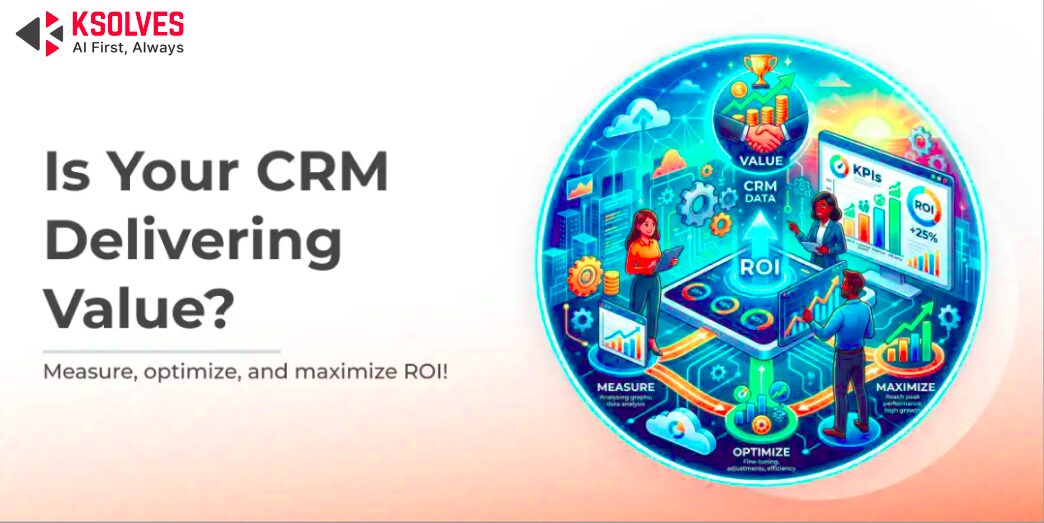
Return on Investment (ROI) is one of the most important metrics when evaluating any business software, and CRM systems are no exception. ROI in this case refers to the measurable value a company gains, such as increased sales, better customer retention, and improved team productivity, compared to what they spend on implementing and maintaining the CRM.
Understanding and tracking CRM ROI is essential. It helps you justify the cost upfront, set realistic performance expectations, and make sure the system continues to support your business goals over time.
Recent research highlights the value of this approach. A study by Nucleus Research found that companies earn an average of $8.71 for every $1 invested in a CRM. Another report by Insightly shows that businesses actively tracking CRM ROI are over twice as likely to hit their revenue targets.
This blog will walk you through the key factors that impact CRM ROI, how to calculate it, and how to improve it through smart implementation and user adoption.
What Factors Drive ROI in CRM
CRM systems deliver value on multiple fronts, from increasing revenue to driving efficiency and long-term customer loyalty. Below are the core factors that fuel high returns on CRM investments:
1. Revenue Growth
A CRM helps you close more deals, faster. It enables your sales and marketing teams to work smarter by:
- Increasing conversion rates: Businesses using CRM tools often report conversion rate improvements of up to 300%, thanks to better lead nurturing and personalized communication.
- Faster pipeline movement: Automations and real-time alerts help sales reps act quickly on opportunities, reducing deal cycle time.
- Improved targeting: CRMs let you segment your audience more precisely, so campaigns hit the right people at the right time.
- Upselling and cross-selling: With a complete view of customer history, reps can recommend higher-value products or complementary services, increasing average deal size.
2. Operational Efficiency & Cost Savings
CRMs reduce the burden of manual work and bring measurable cost benefits:
- Less admin, more selling: Reps spend less time entering data or switching between tools, boosting productivity by up to 30%, according to Salesforce.
- Lower customer acquisition cost: By automating lead scoring and follow-ups, CRM systems help you get more qualified leads with less spend.
- Streamlined processes: Workflows, templates, and task automation keep your teams aligned and reduce the risk of errors or delays.
- Tool consolidation: A CRM can often replace multiple systems (email tools, spreadsheets, calendars), reducing software expenses.
3. Customer Retention & Loyalty
A CRM helps you deliver consistent, high-quality experiences that keep customers coming back:
- Higher satisfaction and NPS: CRMs centralize customer data, enabling personalized service and faster issue resolution.
- Lower churn: Automated reminders, feedback loops, and follow-ups ensure no customer falls through the cracks.
- Increased lifetime value: Engaged, happy customers are more likely to make repeat purchases and refer others.
- Proactive support: CRM alerts help service teams reach out before problems escalate, building stronger relationships.
4. Smarter Decision-Making
CRMs don’t just store data; they turn it into actionable insights:
- Advanced analytics: Track every stage of the funnel, campaign ROI, customer behavior, and sales performance, all in real time.
- Forecasting accuracy: AI-powered CRMs like Salesforce Einstein offer predictive insights that help you plan smarter and grow faster.
5. Better Onboarding & Compliance
CRM systems not only speed up how new team members get up to speed but also ensure your business stays compliant with evolving data regulations.
- Faster onboarding: New hires can ramp up quicker with structured CRM workflows and documentation at their fingertips.
- Regulatory compliance: Modern CRMs come equipped with tools for GDPR, CCPA, and HIPAA compliance, like consent management and audit trails. This helps you avoid fines and build customer trust.
How to Calculate CRM ROI
Calculating the ROI (Return on Investment) of your CRM helps you understand whether your investment is delivering tangible value. The basic formula is:
Here’s how to break it down:
- Identify Total Gains: This includes measurable outcomes such as increased revenue from better sales conversion, time saved by automating manual tasks, improved customer retention, and cost savings from reduced operational overhead.
- Determine Total Costs: Add up all expenses related to the CRM, including licensing fees, implementation services, employee training, customization, support, and ongoing maintenance.
For example, if your CRM helped generate an additional $100,000 in revenue and cost $25,000 to implement and maintain, your ROI would be:
($100,000 – $25,000) / $25,000 = 3 or 300%
This means you earned three times your investment. Consistently tracking ROI helps justify your CRM budget and guides future optimization.
Metrics to Measure CRM ROI
Measuring the return on investment from your CRM system goes beyond revenue. It’s about how well it supports your sales, marketing, and customer service operations. Here’s a breakdown of the most important metrics across each function:
CRM ROI Metrics for Sales
These metrics help you understand how your CRM impacts deal flow, speed, and sales performance:
| Metric | What It Tells You |
|---|---|
| Revenue per lead | Tracks how much revenue you generate per lead. A higher figure means your CRM helps your team prioritise and convert high-value prospects. |
| Sales cycle length | Measures how quickly deals are closing. Shorter cycles point to better process efficiency and follow-up automation. |
| Close rate | Indicates how many leads convert to customers. A higher rate reflects improved lead qualification and sales engagement supported by CRM insights. |
| Average deal size | Tracks the average value of closed deals. Growth suggests your CRM is helping identify upsell opportunities and focus on strategic accounts. |
| Lead response time | Measures how fast your team reaches out after a lead enters the funnel. Faster response improves conversion and reflects good alerting and task automation. |
CRM ROI Metrics for Marketing
Your CRM supports better targeting, lead quality, and campaign effectiveness. Track these metrics:
| Metric | What It Tells You |
|---|---|
| Cost per lead (CPL) | Shows how efficiently your marketing team is generating leads. A declining CPL means CRM is helping optimise audience targeting and campaign performance. |
| Customer acquisition cost (CAC) | Measures the total cost to acquire a customer. A lower CAC indicates improved coordination between sales and marketing workflows. |
| Campaign ROI | Compares revenue generated to campaign spend. A higher campaign ROI shows your CRM is tracking touchpoints accurately and helping refine strategy. |
| Lead engagement rate | Measures how actively leads interact with your emails, content, or ads. High engagement means your CRM supports timely, relevant communication. |
| Marketing-qualified leads (MQLs) | Tracks how many leads are passed from marketing to sales. Growth in MQLs signals strong lead nurturing and accurate scoring. |
CRM ROI Metrics for Customer Service
CRM also plays a major role in retaining customers and maintaining satisfaction. These metrics assess that:
| Metric | What It Tells You |
|---|---|
| Customer retention rate | Indicates how well your CRM supports relationship-building and reduces churn. |
| Customer satisfaction score (CSAT) | Reflects how happy customers are after support interactions. Higher scores point to fast, contextual service. |
| Average resolution time | Tracks how long it takes to resolve issues. A shorter time reflects quicker internal routing and case management. |
| Cases closed the same day | Shows how many support tickets are resolved within 24 hours. High figures indicate efficient access to knowledge and workflows. |
| Net Promoter Score (NPS) | Gauges overall customer loyalty and willingness to recommend your business. A strong NPS means your CRM helps deliver consistent, high-quality service. |
How to Measure ROI in a CRM System: Simple Steps to Follow
Measuring CRM ROI isn’t just about numbers. It’s about understanding how your CRM helps your business grow, save time, and work smarter. Use these four simple steps to calculate your ROI and make informed decisions.
Step 1: List the Benefits You’ve Gained
Think about what’s improved since you started using your CRM. Some gains may be obvious, like higher sales, while others are easy to overlook, like time saved or better team collaboration.
Look for:
- Higher revenue: Are you closing more deals or selling more to existing customers?
- Saved time or effort: Are manual tasks now automated? Has your team become faster?
- Better retention: Are more customers staying with you?
Step 2: Add Up All Your CRM Costs
Your total CRM investment includes more than just the subscription. Here’s what to include:
- CRM software fees: Monthly or yearly costs
- Setup and customization: Any initial setup, integration, or data migration
- Training: Time and resources spent teaching your team how to use the system
- Support and updates: Ongoing tech support or third-party help
Step 3: Use This Simple Formula
Once you have your gains and investment figures, use this basic formula:
CRM ROI = ((Total Gains − Total Costs) / Total Costs) × 100
Example: Gains: ₹8,00,000. Costs: ₹3,20,000. ROI = ((8,00,000 − 3,20,000) / 3,20,000) × 100 = 150% ROI
That means for every ₹1 you spent, you earned ₹1.50 in return.
Ready to Turn Your CRM Into a Revenue Engine?
Step 4: Understand What the Number Tells You
Don’t stop at the percentage. Use the results to guide your next steps:
- Double down on what works: If lead automation or reporting features brought strong returns, keep using and improving them.
- Fix what’s lagging: If an area like customer support didn’t improve, check whether your team needs better training or different tools.
- Plan better: Use your findings to budget, plan features, or expand CRM use across other departments.
Tracking ROI this way helps you see what’s working, where you’re getting real value, and what to improve next. It turns your CRM from just another system into a long-term growth asset.
Best Practices to Maximize CRM ROI
Maximizing your CRM’s return on investment goes beyond just implementation—it’s about how consistently and strategically you manage it. Below are the most effective ways to ensure your CRM continues to deliver value across your organization:
1. Align CRM Goals with Business Objectives
Before diving into dashboards and automation, take a step back and define what success looks like for your business. Are you aiming to shorten your sales cycle? Improve lead conversion rates? Strengthen customer retention?
Make sure your CRM setup and usage are directly tied to those goals. For example, if your objective is to improve customer satisfaction, then focus on using the CRM to streamline support workflows, personalize communication, and track feedback efficiently. This alignment ensures that every feature, integration, and workflow you build in the CRM serves a larger business purpose.
2. Drive User Adoption Through Training and Governance
A CRM is only as powerful as the people using it. One of the biggest reasons CRM systems fail to deliver ROI is low user adoption. Combat this by offering comprehensive training tailored to each department’s needs. Sales reps, marketers, support agents, and leadership all use CRM differently.
Go beyond initial onboarding. Conduct regular refresher sessions, share tips and updates, and appoint a CRM administrator or champion who can answer questions and keep the system organized. Clear governance policies also help avoid clutter, duplicate data, and inconsistent usage, all of which drain productivity and ROI.
3. Integrate with Other Key Systems
A CRM shouldn’t operate in isolation. When integrated with systems like your ERP (for finance and inventory), marketing automation tools (for campaigns), and service platforms (like helpdesks or ticketing), your CRM becomes a central hub of intelligence.
These integrations eliminate manual data entry, reduce errors, and ensure everyone works from the same real-time customer data. For instance, a sales rep can instantly see a customer’s billing status from the ERP, while marketing can tailor campaigns based on support tickets. This level of transparency and efficiency directly contributes to faster decision-making and stronger ROI.
4. Monitor Performance with KPI Dashboards
If you’re not measuring it, you can’t improve it. Use CRM dashboards to track key performance indicators like lead response time, conversion rates, sales velocity, average deal size, and customer satisfaction. These dashboards offer a snapshot of your team’s effectiveness and the CRM’s impact.
Set up role-based views so each team sees the metrics most relevant to their goals. This not only boosts accountability but also helps you identify patterns and spot issues early. For example, if win rates drop suddenly, you can investigate and address the cause before it affects revenue.
5. Review and Refine Your CRM Strategy Regularly
CRM success isn’t a “set it and forget it” process. As your business evolves, customer behavior changes, and new features are released, you should revisit your CRM strategy to keep it optimized.
Schedule quarterly or biannual CRM reviews. Look at user adoption stats, data hygiene, workflow efficiency, and feedback from team members. Are there features going unused? Can automation be improved? Are integrations up to date? Making small, ongoing improvements keeps your CRM aligned with your business needs and ensures long-term ROI.
Common ROI Pitfalls to Avoid
Even the most powerful CRM systems can underperform if a few critical mistakes are made. To truly maximize your return on investment, it’s important to be aware of these common pitfalls and actively prevent them.
1. Low User Adoption Rates
One of the biggest reasons companies don’t see the expected ROI from their CRM is simple: employees don’t use it consistently. If your sales reps are still logging notes in spreadsheets or your support team avoids updating cases in the system, the CRM loses value fast.
How to fix it: Invest in hands-on training, make the CRM intuitive for daily use, and show users how it actually helps them work faster and smarter, not harder.
2. Poor Data Quality
Bad data leads to bad decisions. Incomplete, duplicate, or outdated records make it hard to trust the CRM. Sales might follow up with the wrong lead, marketing could send emails to unsubscribed contacts, or reports might reflect inaccurate insights.
How to fix it: Set up data validation rules, automate duplicate checks, and schedule regular data hygiene tasks to keep your CRM clean and reliable.
3. Lack of Tracking and Visibility
If you’re not tracking key CRM metrics or don’t have clear dashboards, it becomes impossible to measure performance or prove ROI. You won’t know what’s working, what’s broken, or where to improve.
How to fix it: Define success metrics from the start, build dashboards for each team, and make reporting a routine part of CRM usage. Visibility leads to accountability and better results.
Conclusion
CRM systems can deliver significant value. It helps boost revenue, improve team productivity, and deepen customer relationships. But that value doesn’t happen automatically. It comes from smart implementation, regular performance tracking, and continuous improvement. By aligning CRM goals with business objectives, promoting adoption, and using real-time insights, companies can turn their CRM into a true growth asset.
At Ksolves, we help businesses get the most from their CRM investment. Whether you’re starting fresh or need advanced customizations, our CRM development services are built to match your workflows, scale with your goals, and deliver long-term ROI.































Author
About the Author Editorial Team The Ksolves Editorial Team includes certified Salesforce experts, Big Data engineers, AI/ML specialists, Zoho consultants, and experienced technology writers focused on delivering clear, actionable insights for modern businesses. With hands-on experience across Salesforce, Big Data platforms, AI/ML solutions, application development, software testing, and Zoho ERP/CRM, the team publishes practical guides, real-world use cases, and industry updates that support smarter decisions and faster growth. Every article is created to solve business challenges, guide technology adoption, and keep organizations aligned with evolving digital ecosystems.
Share with